
Coding heatmap for Claude Code + Codex + Grok + DeepSeek Harness. Scans local logs and renders a
GitHub-style contribution heatmap — in your terminal, as a local SVG/HTML report, or
published to a public report page (https://.../u/<you>) with an embeddable badge.
Privacy: only per-day token/cost counts and model names ever leave your machine. Never your prompts, code, or project names.
npm i -g @tao-hpu/ccmapThat's the whole install (the command is still just ccmap). Then:
ccmap scan      # see your usage in the terminal — colored heatmap, no upload, no setup
ccmap push      # claim a name + publish → your report page at https://ccmap.fim.ai/u/<you>
ccmap start     # keep it fresh: push once a day in the background
Don't want to install? npx @tao-hpu/ccmap@latest scan runs it once, always latest.
scan/render/reportare fully local and need no setup.push/startpublish to the public badge service athttps://ccmap.fim.ai(baked in — zero config). Running your own is possible too — see Self-hosting.
Local only — no setup, nothing leaves your machine:
| Command | What it does |
|---|---|
ccmap scan |
Summarize local usage (tokens, est. cost, streak, model mix) + terminal heatmap. |
ccmap render [--out f.svg] [--theme …] [--anim ember|wave|cascade] [--metric tokens|cost] [--weeks 26] [--border] [--rounded] |
Render a heatmap SVG locally. |
ccmap report [--out f.html] [--theme …] |
Render a full shareable HTML report (with a live customizer). |
Publish & keep fresh (uses the public badge service at https://ccmap.fim.ai — zero config):
| Command | What it does |
|---|---|
ccmap push [--user <name>] |
Publish your aggregates → prints your report page (/u/<you>: heatmap, stats, live badge customizer) and an embeddable badge SVG (/u/<you>.svg). First run auto-claims a username (prompts on a terminal, default = your OS name; set it with --user or CCMAP_USER) — no separate login step. |
ccmap start [--foreground] |
Schedule a daily background push via launchd/cron (survives logout/reboot, no terminal needed). --foreground runs an attached loop. |
ccmap stop |
Remove the scheduled push. |
ccmap status |
Show the schedule + last push. |
Housekeeping:
| Command | What it does |
|---|---|
ccmap config [--interval <min>] [--metric tokens|cost] [--theme …] [--weeks 26] |
View / update saved settings in ~/.ccmap/config.json. |
ccmap update |
Self-update to the latest published version. |
ccmap version · ccmap help |
Print version / usage. |
ccmap login --user <name> --endpoint <url> [--invite <code>] |
Optional / advanced. Only needed to claim a specific username or point at a self-hosted server — plain push already auto-claims against the default service. |
- Claude Code:
~/.claude/projects/**/*.jsonl(assistantmessage.usage) - Codex:
~/.codex/sessions/YYYY/MM/DD/rollout-*.jsonl(token_countevents) - Grok:
~/.grok/sessions/**/updates.jsonl(turn_completedevents) - DeepSeek Harness:
~/.dsh/sessions/**/session[.vN].jsonl[.zstd](v0–v3;$DSH_HOME/sessionswhenDSH_HOMEis set)
Each engine you've used shows up on its own in the model mix, the daily chart and
the engine-split donut; ones you haven't are simply absent. Grok's logs are much
larger than the others (multi-GB is routine), so scans keep a small per-file
cache at ~/.ccmap/scan-cache.json and only re-read logs that have changed —
a warm scan stays around a second no matter how much history has piled up.
DeepSeek Harness logs are read locally, including Zstandard compression; no
system zstd command or running Harness process is required. Only the highest
format generation in each session directory is counted. Fork-inherited history
is excluded, while new subagent calls and retries with recorded usage count.
Cached input is counted separately from uncached input; reasoning tokens are
already part of output and are not added again. Usage belongs to the Harness
source even when it runs a different provider's model.
DeepSeek's separate cache (~/.ccmap/scan-cache.json.deepseek) is invalidated by
log, timezone, parser or pricing changes. It uses the same per-file cache helpers
as Grok, with separate storage so each source's cleanup cannot evict the other's
entries. Missing usage is never inferred from text. Unreadable logs, unknown
formats and malformed usage produce local warnings; complete records before an
incomplete tail are retained. ccmap never
rewrites or migrates Harness logs. JSONL persistence is supported; SQLite and
unrecorded auxiliary/search calls are not scanned.
Claude Code prunes its own session logs after ~30 days (cleanupPeriodDays,
default 30), and Codex and Grok have their own retention — so the raw logs are a
rolling window, not your full past. If a fresh heatmap looks sparse, that's why: the
older transcripts are already gone from disk.
To stop losing history going forward, every scan / render / report /
push snapshots each day's totals into a tiny rollup at ~/.ccmap/history.json
(a few KB/year), kept per engine so one CLI's pruning never costs you another's
history. Once a day is recorded it stays on the heatmap even after Claude Code
deletes the raw transcript — so the map keeps lighting up over time. This is
fully automatic and local: it touches no Claude Code / Codex / Grok / Harness config,
and nothing extra leaves your machine.
Run regularly (e.g.
ccmap start, which pushes daily) so each day is captured before the 30-day prune removes it. Already-deleted history can't be recovered — it accumulates from when you start running ccmap.
Cost is an estimate from a built-in per-model price table (USD per 1M tokens:
in input, out output, cw 5-min cache write, cr cache read, cw1h 1-hour
cache write). Defaults track current list prices. Claude models are priced per
version, because versions within one family no longer share a price. Each model
takes the price of the nearest listed version at or below its own (Opus 4.1 uses
the Opus 4 row), and a version newer than the table uses the newest row of its
family. Hyphenated, dotted, @-dated and provider-prefixed ids
(claude-opus-4.1, claude-opus-4@20250514, anthropic.claude-opus-5-5) resolve
the same way.
GPT/Codex entries track the current OpenAI rates, including
gpt-5.3-codex/gpt-5.2 at $1.75/$14 and gpt-5.5 at $5/$30 (input/output;
cached input and cache creation are charged separately). Cache reads (the dominant
cost in agent loops) and the two cache-write tiers Claude reports are all priced
separately.
Built-in Claude rates, checked against Claude API pricing on 2026-10-12 (USD per 1M tokens):
| Model | Input | Cache read | 5m / 1h cache write | Output |
|---|---|---|---|---|
claude-fable-5-1 / claude-mythos-5-1 |
$10.00 | $0.25 | $12.50 / $20.00 | $50.00 |
claude-fable-5 / claude-mythos-5 |
$10.00 | $1.00 | $12.50 / $20.00 | $50.00 |
claude-opus-5-5 |
$4.00 | $0.20 | $5.00 / $8.00 | $20.00 |
claude-opus-5, claude-opus-4-5 – 4-8 |
$5.00 | $0.50 | $6.25 / $10.00 | $25.00 |
claude-opus-4-1, claude-opus-4 |
$15.00 | $1.50 | $18.75 / $30.00 | $75.00 |
claude-sonnet-5-5 |
$2.00 | $0.10 | $2.50 / $4.00 | $10.00 |
claude-sonnet-5 |
$2.00 | $0.20 | $2.50 / $4.00 | $10.00 |
claude-sonnet-4, 4-5, 4-6 |
$3.00 | $0.30 | $3.75 / $6.00 | $15.00 |
claude-haiku-5-5 (prompts up to 100K tokens) |
$0.10 | $0.01 | $0.125 / $0.20 | $0.50 |
claude-haiku-4-5 |
$1.00 | $0.10 | $1.25 / $2.00 | $5.00 |
claude-3-5-haiku |
$0.80 | $0.08 | $1.00 / $1.60 | $4.00 |
Claude 4.6 and later, except Haiku 5.5, bill the full 1M context at the
standard rate. Earlier models charged a premium above 200K input tokens, and
Haiku 5.5 charges 5x on requests whose prompt exceeds 100K tokens; ccmap does
not apply either, so long-context requests on those models are estimated low.
Batch, fast-mode and data-residency multipliers are not applied. Claude 3 models
other than Haiku 3.5 are not on the current price page and use the generic
$3/$15 fallback.
Sources: OpenAI API pricing, GPT-5.3-Codex, and GPT-5.2-Codex, checked on 2026-10-12. The values below use the Standard short-context API rate; requests over 272K input tokens can have higher long-context rates that ccmap does not currently apply.
The built-in Codex model rates, including models retained for historical logs, are (USD per 1M tokens):
| Model | Input | Cached input | Cache writes | Output |
|---|---|---|---|---|
gpt-6-astra |
$10.00 | $1.00 | $12.50 | $50.00 |
gpt-6.1-sol |
$2.00 | $0.10 | $2.50 | $10.00 |
gpt-6-sol |
$2.00 | $0.20 | $2.50 | $10.00 |
gpt-6-luna |
$0.10 | $0.01 | $0.125 | $0.50 |
gpt-5.6-sol |
$4.00 | $0.40 | $5.00 | $20.00 |
gpt-5.6-terra |
$2.00 | $0.20 | $2.50 | $12.00 |
gpt-5.6-luna |
$0.20 | $0.02 | $0.25 | $1.20 |
gpt-5.5 |
$5.00 | $0.50 | - | $30.00 |
gpt-5.4 |
$2.50 | $0.25 | - | $15.00 |
gpt-5.4-mini |
$0.75 | $0.075 | - | $4.50 |
gpt-5.3-codex / gpt-5.2-codex / gpt-5.2 |
$1.75 | $0.175 | - | $14.00 |
gpt-5.1 / gpt-5 |
$1.25 | $0.125 | - | $10.00 |
A - means the price is unavailable or not applicable and is treated as zero by
the estimator. Codex logs currently report cache reads only; cache-write prices
remain available for usage records that provide them.
API-only OpenAI models are intentionally excluded. Add a custom entry under
pricing only when using a separately configured provider in Codex.
Grok is the exception: its CLI records what it actually billed for each turn, so ccmap uses that number instead of estimating. It accounts for backend search and tool calls that a token count alone can't, which is why Grok's cost per token can look higher than the table would suggest. The Grok entries in the table are only a fallback for turns that logged tokens without a cost. They use the rates under 200K prompt tokens from xAI's model pages, checked on 2026-10-12 (USD per 1M tokens; cache writes are billed as input):
| Model | Input | Cached input | Output |
|---|---|---|---|
grok-4.7 / grok-4.6 |
$2.00 | $0.50 | $6.00 |
grok-4.5 |
$2.00 | $0.30 | $6.00 |
DeepSeek Harness uses a current-price estimate, not a reconstruction of historical invoices. The built-in USD rates, checked against DeepSeek's official pricing on 2026-09-17, are per 1M tokens:
| Model | Uncached input (peak / off-peak) | Cached input (peak / off-peak) | Output (peak / off-peak) |
|---|---|---|---|
deepseek-flash |
$0.30 / $0.15 | $0.006 / $0.003 | $1.20 / $0.60 |
deepseek-v4-pro |
$1.32 / $0.66 | $0.044 / $0.022 | $3.96 / $1.98 |
deepseek-v4-flash and deepseek-v4-flash-vision-exp use the current Flash
rate. Peak hours are Monday–Friday, 01:00–04:00 and 06:00–10:00 UTC, selected
using each attempt's start time. Off-peak hours (including weekends) are
half-price; attempts crossing a time boundary keep their start-time rate.
Daily activity uses the completion time in the
local timezone. Official rates apply only to the deepseek-official provider.
Unknown models/providers still contribute tokens; their unpriced tokens are
excluded from cost and the displayed estimate is marked partial.
For Harness models, the longest matching user override (case-insensitive)
takes precedence over built-in rates and is used as a flat rate without the
off-peak discount. For example, a custom provider can be configured with
"pricing": { "my-model": { "in": 1, "out": 2, "cr": 0.1, "cw": 0 } }.
Override any model in ~/.ccmap/config.json. Override keys match as substrings
of the model id and the longest key wins, so claude-opus-5 also covers
claude-opus-5-5 unless that has its own key:
{ "pricing": { "claude-opus-5-5": { "in": 4, "out": 20, "cw": 5, "cr": 0.2, "cw1h": 8 } } }ccmap update # self-update to latest (same as `npm i -g @tao-hpu/ccmap@latest`)The resident daemon (ccmap start) checks npm once a day and prints when a new
version exists; set "autoUpdate": true in ~/.ccmap/config.json to auto-install.
pnpm build                # tsc -> dist/
pnpm link --global        # dev: `ccmap` points at this working copy
npm version patch         # bump + git tag (patch | minor | major)
npm publish               # runs prepublishOnly (tsc); ships dist/ only
Published as the scoped package @tao-hpu/ccmap (the bare ccmap name is
blocked by npm for similarity to cc-map); the installed CLI command is still
ccmap. Releases use a 2FA-bypassing automation token in .env via pnpm release.
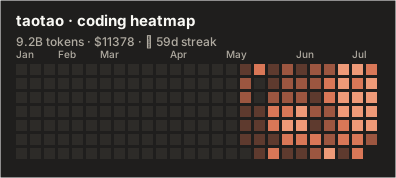
ccmap push gives you a report page at https://ccmap.fim.ai/u/<you> — the full
heatmap, stats, and a live customizer (theme / weeks / animation) that generates
ready-to-paste embed snippets, including the auto light/dark <picture> block below.
Grab the badge SVG from there, or embed it directly (GitHub renders SVG natively):
| param | values | default |
|---|---|---|
theme |
claude claude-light codex codex-dark codex-light github-dark github-light tokyo-night dracula nord (codex selects codex-light; dark/light are aliases) |
claude |
metric |
tokens cost |
tokens |
weeks |
1..53 |
26 |
border |
true false |
false on Node; ignored by Worker |
rounded |
true false |
false on Node; ignored by Worker |
hide_border |
true disables the Worker border |
false |
Add themes by editing the THEMES registry in src/render.ts — each is just a
palette, instantly available as ?theme=<name>.
Badge options retain their existing backend-specific behavior. Node badges are
borderless and square by default; exact border=true and rounded=true opt in.
Worker badges are bordered and square by default, and hide_border=true removes
the border; Worker continues to ignore border and rounded. The report
customizer appends border=true or rounded=true only while the corresponding
checkbox is checked.
| Surface | How to select a Codex theme |
|---|---|
| Terminal heatmap | ccmap config --theme codex-dark, then ccmap scan |
| Local SVG | ccmap render --theme codex-light --out heatmap.svg |
| Local HTML | ccmap report --theme codex-dark --out report.html |
| Node/Worker SVG badge | /u/alice.svg?theme=codex-dark |
| Node/Worker HTML aliases | /u/alice?theme=codex-light or /u/alice.html?theme=codex-light |
| Node social PNG | /u/alice.png?theme=codex-dark |
| Node portrait PNG | /u/alice.png?shape=portrait&theme=codex-light |
| Node badge PNG | /u/alice.png?card=badge&theme=codex-dark |
| Report preview and embeds | Select codex or either explicit Codex variant in Customize & share |
A single image URL can't detect the viewer's color mode. GitHub's official trick is
<picture> with prefers-color-scheme — serve two themed URLs and the README swaps
automatically:
<picture>
  <source media="(prefers-color-scheme: dark)"
          srcset="https://ccmap.fim.ai/u/taotao.svg?theme=github-dark">
  <source media="(prefers-color-scheme: light)"
          srcset="https://ccmap.fim.ai/u/taotao.svg?theme=github-light">
  <img src="https://ccmap.fim.ai/u/taotao.svg?theme=github-dark" alt="coding heatmap">
</picture>Most people just use the public service. But if you'd rather keep data in-house
(e.g. inside a company), the repo ships the badge server too — point the CLI at it
with ccmap login --endpoint <url> (that's the one reason to use login). Two
interchangeable backends, same API:
- Node —
src/server.ts, zero-dep JSON-file store:node dist/server.js(envCCMAP_DATA,PORT). - Cloudflare Worker —
server/, KV-backed:wrangler deploy.
Push payloads are forward-compatible: fields a server doesn't know about are
ignored, so an old server keeps accepting pushes from a new CLI. It just won't
chart what it can't read — after the CLI learns a new engine, redeploy the
server to see it on the hosted report page. DeepSeek adds optional source counts
in days[].deepseek and totals.bySource.deepseek. Optional unpricedTokens in
daily records and totals counts tokens whose cost could not be estimated; these
tokens remain in the token totals but contribute nothing to the reported cost.
The uploader omits unpricedTokens when zero, and both server implementations
treat missing fields as zero, accepting older payloads unchanged. These fields
contain only aggregates, never prompts, project paths or raw events. The public
service needs an updated deployment to display DeepSeek's source split and
partial costs.
Optional write gate: set PUSH_SECRET; clients pass ccmap login --invite <code>.
No accounts: your first push mints a local secret and the server stores only its
sha256, never the key itself — so back up ~/.ccmap/config.json.
- ✅ Local:
scan/render/report/login/push/start— verified against real Claude Code, Codex, Grok and DeepSeek Harness logs. - ✅ Server: live at
https://ccmap.fim.ai(Node,src/server.ts) — claim, per-user auth, badge + HTML report all verified end-to-end. Cloudflare Worker (server/) is an interchangeable alternative. - ⏳ PNG route (
/u/:user.png): SVG covers GitHub/Notion/Slack. PNG (for X/Twitter) is one dep away — add@resvg/resvg-wasmand a.pngroute. - 💡 Ideas backlog: leaderboard, "AI Wrapped" recap card, model fingerprint, streak-only mini badge.
Code that shipped, in order of first contribution.
 tao-hpu Author |
 SyloYamtao Codex light / dark themes #1 |