

A custom Home Assistant card that visualizes indoor air comfort using temperature and humidity sensors. The card combines both values into a single circular "comfort dial" with a moving dot indicator, showing whether a room feels cold, warm, dry, humid, or comfortable.
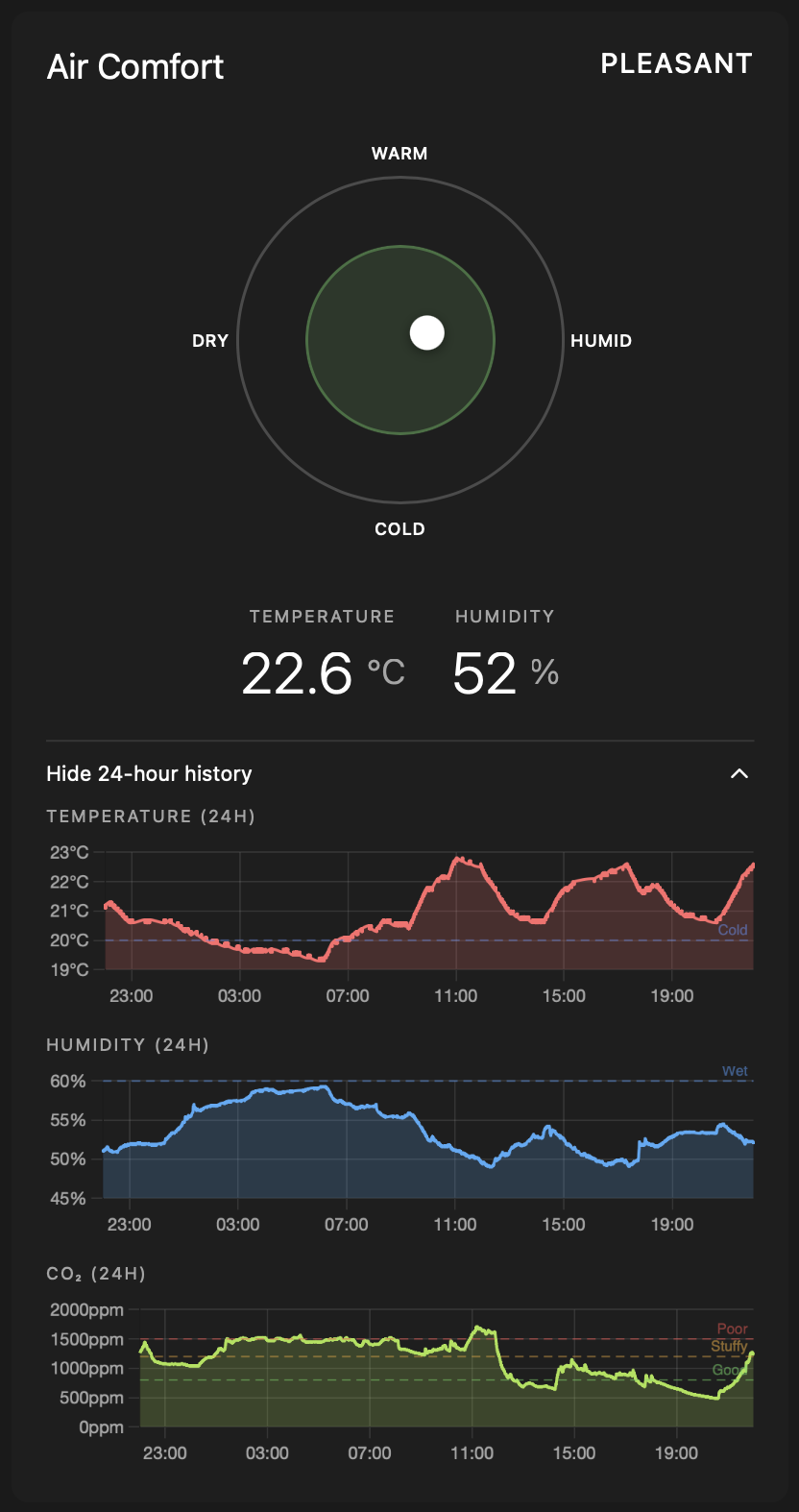
- 🎯 Circular Comfort Dial: Visual representation of comfort zones with color-coded regions
- 📍 Moving Indicator: Dynamic dot that shows current conditions on the dial
- 🌡️ Temperature & Humidity Display: Clear readings with customizable units
- 🟢 Air Quality Status: Overall air quality message (Good / Moderate / Poor) derived from all configured air quality sensors, based on WHO 2021 and ASHRAE guidelines
- 📊 24-Hour History Charts: Line graphs for temperature, humidity, CO2, NO2, PM 1, PM 2.5, PM 10, Radon, and VOC
- 🌍 Multi-Language Support: UI adapts to your Home Assistant language setting (English and German included; easily extensible)
- 🎨 Theme-Aware: Automatically adapts to your Home Assistant theme
- ⚙️ Configurable: Customize visibility of different elements via YAML
- 🧹 Clean & Intuitive: Modern design inspired by thermostat apps
- 🔧 TypeScript + Lit + Chart.js: Built with modern web technologies


- Open HACS in your Home Assistant instance
- Click on "Frontend"
- Click the three dots in the top right corner
- Select "Custom repositories"
- Add this repository URL:
https://github.com/mrded/ha-air-comfort-card - Select category "Lovelace"
- Click "Add"
- Find "Air Comfort Card" in the list and click "Install"
- Restart Home Assistant
- Download the
air-comfort-card.jsfile from the latest release - Copy it to your
config/wwwfolder - Add the following to your
configuration.yaml:
lovelace:
  resources:
    - url: /local/air-comfort-card.js
type: module- Restart Home Assistant
The card can be configured either through the visual editor (recommended) or manually via YAML.
- Add a new card to your dashboard
- Search for "Air Comfort Card"
- Select your temperature and humidity sensors
- Customize the card title and display options
- Save the card
type: custom:air-comfort-card
temperature_entity: sensor.living_room_temperature
humidity_entity: sensor.living_room_humiditytype: custom:air-comfort-card
temperature_entity: sensor.living_room_temperature
humidity_entity: sensor.living_room_humidity
co2_entity: sensor.living_room_co2
no2_entity: sensor.living_room_no2
pm1_entity: sensor.living_room_pm1
pm25_entity: sensor.living_room_pm25
pm10_entity: sensor.living_room_pm10
radon_entity: sensor.living_room_radon
voc_entity: sensor.living_room_voc
name: Living Room Comfort
temperature_unit: C
temp_c_min: 20
temp_c_max: 24
temp_f_min: 68
temp_f_max: 75
humidity_min: 40
humidity_max: 60| Name | Type | Required | Default | Description |
|---|---|---|---|---|
type |
string | Yes | - | Must be custom:air-comfort-card |
temperature_entity |
string | Yes | - | Entity ID of your temperature sensor |
humidity_entity |
string | Yes | - | Entity ID of your humidity sensor |
co2_entity |
string | No | - | Entity ID of your CO2 sensor |
no2_entity |
string | No | - | Entity ID of your NO2 (Nitrogen Dioxide) sensor |
pm1_entity |
string | No | - | Entity ID of your PM 1 sensor |
pm25_entity |
string | No | - | Entity ID of your PM 2.5 sensor |
pm10_entity |
string | No | - | Entity ID of your PM 10 sensor |
radon_entity |
string | No | - | Entity ID of your Radon sensor |
voc_entity |
string | No | - | Entity ID of your VOC (Volatile Organic Compounds) sensor |
name |
string | No | Air Comfort |
Custom title for the card (editable via visual editor) |
temperature_unit |
string | No | C |
Temperature display unit: C for Celsius or F for Fahrenheit |
temp_c_min |
number | No | 20 |
Lower bound of comfortable temperature in Celsius |
temp_c_max |
number | No | 24 |
Upper bound of comfortable temperature in Celsius |
temp_f_min |
number | No | 68 |
Lower bound of comfortable temperature in Fahrenheit |
temp_f_max |
number | No | 75 |
Upper bound of comfortable temperature in Fahrenheit |
humidity_min |
number | No | 40 |
Lower bound of comfortable humidity (%) |
humidity_max |
number | No | 60 |
Upper bound of comfortable humidity (%) |
The card calculates comfort levels based on commonly accepted indoor comfort standards (ASHRAE 55):
- Ideal Zone: 20-24°C (68-75°F) with 40-60% humidity
- Color Zones:
- 🟢 Green: Perfect comfort
- 🟡 Yellow: Acceptable/slightly uncomfortable
- 🔴 Red: Uncomfortable conditions
- 🔵 Blue: Very uncomfortable
The moving dot indicator shows your current conditions relative to these zones, making it easy to see at a glance whether your indoor environment needs adjustment.
When one or more air quality sensors are configured (CO2, NO2, PM 1, PM 2.5, PM 10, Radon, VOC), the card displays an overall Air quality message below the temperature and humidity readings.
The status reflects the worst sensor reading across all configured sensors:
| Status | Indicator | Meaning |
|---|---|---|
| Good | 🟢 | All sensors within the good threshold |
| Moderate | 🟠 | At least one sensor above the good threshold but at or below the warning threshold |
| Poor | 🔴 | At least one sensor above the warning threshold |
Thresholds are based on WHO 2021 air quality guidelines and ASHRAE 62.1 (VOC uses common IAQ guidelines):
| Sensor | Good | Moderate | Poor |
|---|---|---|---|
| CO2 | ≤ 800 ppm | ≤ 1200 ppm | > 1200 ppm |
| NO2 | ≤ 50 µg/m³ | ≤ 150 µg/m³ | > 150 µg/m³ |
| PM 1 | ≤ 10 µg/m³ | ≤ 25 µg/m³ | > 25 µg/m³ |
| PM 2.5 | ≤ 15 µg/m³ | ≤ 35 µg/m³ | > 35 µg/m³ |
| PM 10 | ≤ 45 µg/m³ | ≤ 100 µg/m³ | > 100 µg/m³ |
| Radon | ≤ 100 Bq/m³ | ≤ 150 Bq/m³ | > 150 Bq/m³ |
| VOC | ≤ 150 | ≤ 250 | > 250 |
The card UI (status labels, dial labels, reading names, chart headings, and editor fields) automatically follows your Home Assistant language setting.
Supported languages:
| Code | Language |
|---|---|
en |
English (default) |
de |
German / Deutsch |
Unsupported languages fall back to English.
- Copy
src/translations/en.tstosrc/translations/<code>.ts(e.g.fr.ts). - Translate every value in the new file. Keep all keys unchanged.
- Open
src/translations/index.tsand add one import and one entry:
import { fr } from './fr';
// …
const TRANSLATIONS: Record<string, Translations> = { en, de, fr };
That's it — no other files need to change.
- Bun (or Node.js 16+ with npm)
# Clone the repository
git clone https://github.com/mrded/ha-air-comfort-card.git
cd ha-air-comfort-card

# Install dependencies
bun install

# Build the card
bun run build

# Watch for changes (development)
bun run watch
The compiled file will be in the dist folder.
The card integrates with Home Assistant's theme system. Most colors are inherited automatically from the active HA theme.
You can override specific card colors using CSS custom properties, either in your themes.yaml or via card-mod.
| Variable | Fallback | Description |
|---|---|---|
--air-comfort-zone-color |
--success-color |
Color of the comfort zone circle |
Example — change the comfort zone circle to orange using card-mod:
type: custom:air-comfort-card
temperature_sensor: sensor.indoor_temperature
humidity_sensor: sensor.indoor_humidity
card_mod:
  style: |
    ha-card {
      --air-comfort-zone-color: #FF8C00;
    }
Example — apply via a custom HA theme (themes.yaml):
my_custom_theme:
air-comfort-zone-color: "#FF8C00"Contributions are welcome! Please feel free to submit a Pull Request.
This project is licensed under the MIT License - see the LICENSE file for details.
If you have questions or issues:
- Check the documentation
- Search existing issues
- Create a new issue if needed
Inspired by modern thermostat interfaces and the need for better indoor air quality monitoring in Home Assistant.