




Play the original DOOM in your Home Assistant dashboard. 🎮
It is a well-known tradition that DOOM runs on everything. Calculators, ATMs, pregnancy tests, tractors, thermostats, and even a LEGO brick. If it has a screen and a processor, someone will make DOOM run on it. It was only a matter of time before Home Assistant joined the club.
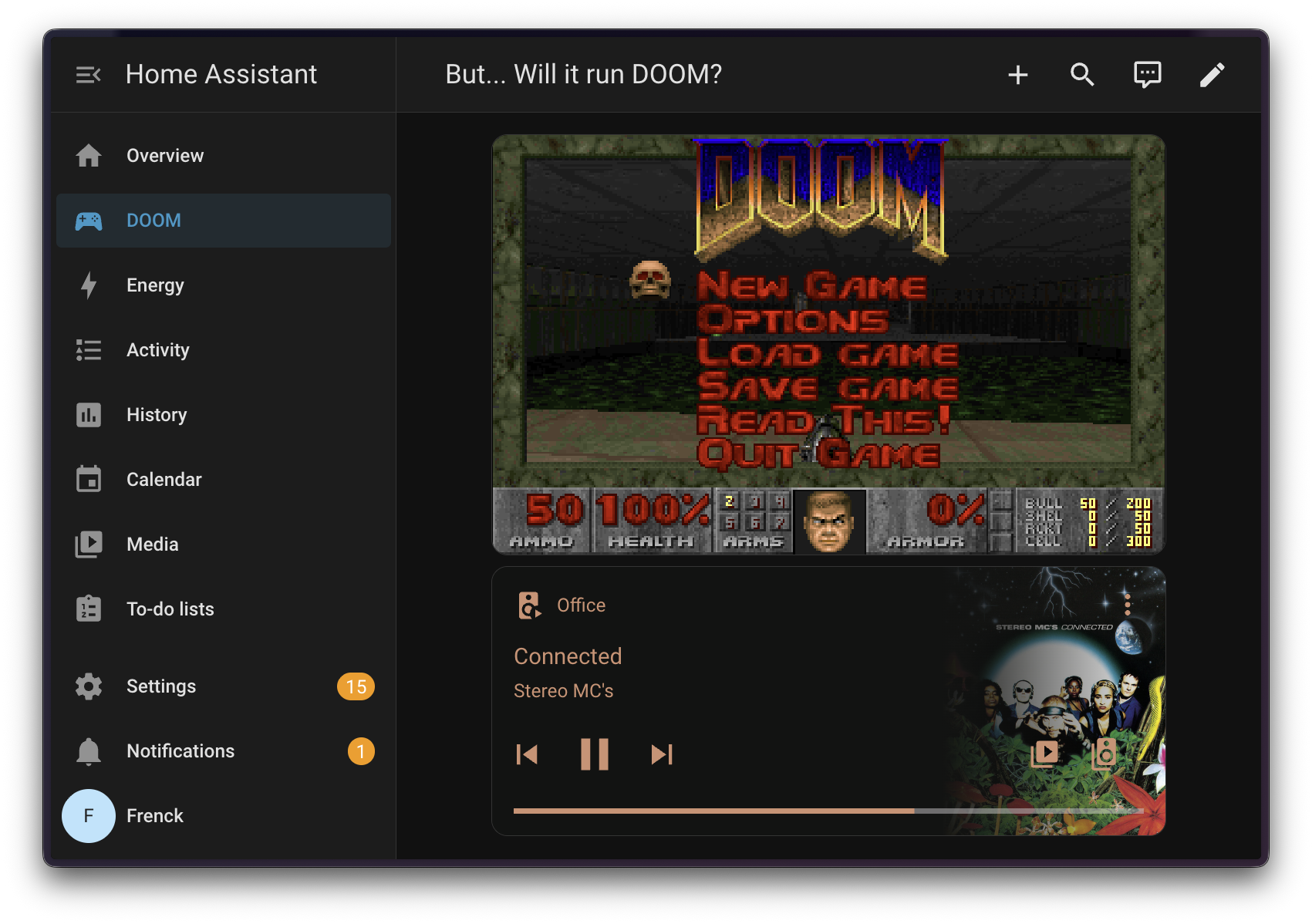
This custom integration adds a dashboard card that lets you play the original
DOOM (1993) directly inside your Home Assistant dashboard. It uses
js-dos to run the real DOOM.EXE through a DOSBox
emulator compiled to WebAssembly, right in your browser.
The shareware version of DOOM (Episode 1: Knee Deep in the Dead) is included and freely redistributable per id Software's original shareware license.
This is a fun effort, but it carries a vision: imagine a gaming dashboard in Home Assistant with small games you can play, no matter where you are. Your smart home, your rules, your entertainment.
This project was entirely written by AI. Not just assisted, entirely written. The Python backend, the TypeScript frontend card, the DOSBox configuration, the build tooling, the translations, and even this README. All of it.
It was built using Visual Studio Code with GitHub Copilot, powered by the Claude Opus 4.6 model. The process started with an extensive prompt describing what this project should be, and from there, the AI handled every aspect of the implementation. The whole thing took less than 2 hours from start to finish.
It is wild how capable AI has become. What would have taken days of work, reading documentation, debugging edge cases, and wiring everything together, was done in a single sitting with a conversation. We live in amazing times.
Massive thanks to GitHub for providing Copilot free of charge. 🙏
No kittens or octocats have been harmed during the development of this integration. 🐱
- Make sure HACS is installed in your Home Assistant instance.
- Add this repository as a custom repository in HACS:
- Go to HACS > Integrations > ⋮ > Custom repositories
- Add
https://github.com/frenck/home-assistant-doomwith category Integration
- Search for "DOOM" in HACS and install it.
- Restart Home Assistant.
- Go to Settings > Devices & services > Add integration and search for "DOOM".
- Download the latest release from the releases page.
- Extract the
doom.zipfile. - Copy the
custom_components/doomfolder to your Home Assistantconfig/custom_components/directory. - Restart Home Assistant.
- Go to Settings > Devices & services > Add integration and search for "DOOM".
After installing and setting up the integration:
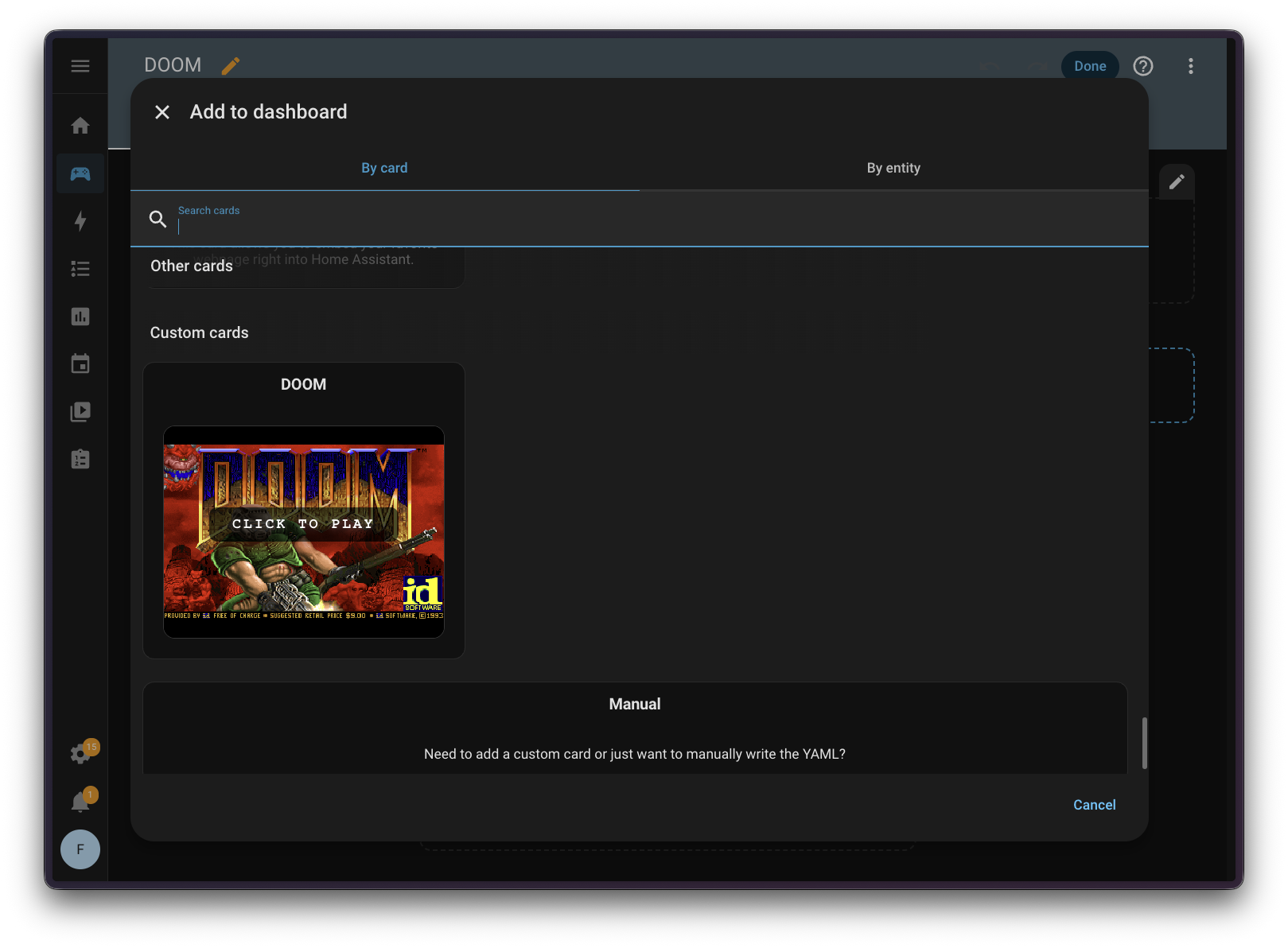
- Edit any dashboard.
- Click Add card.
- Search for DOOM.
- Add the card and resize it to your liking.
- Click "Click to play" to start the game.
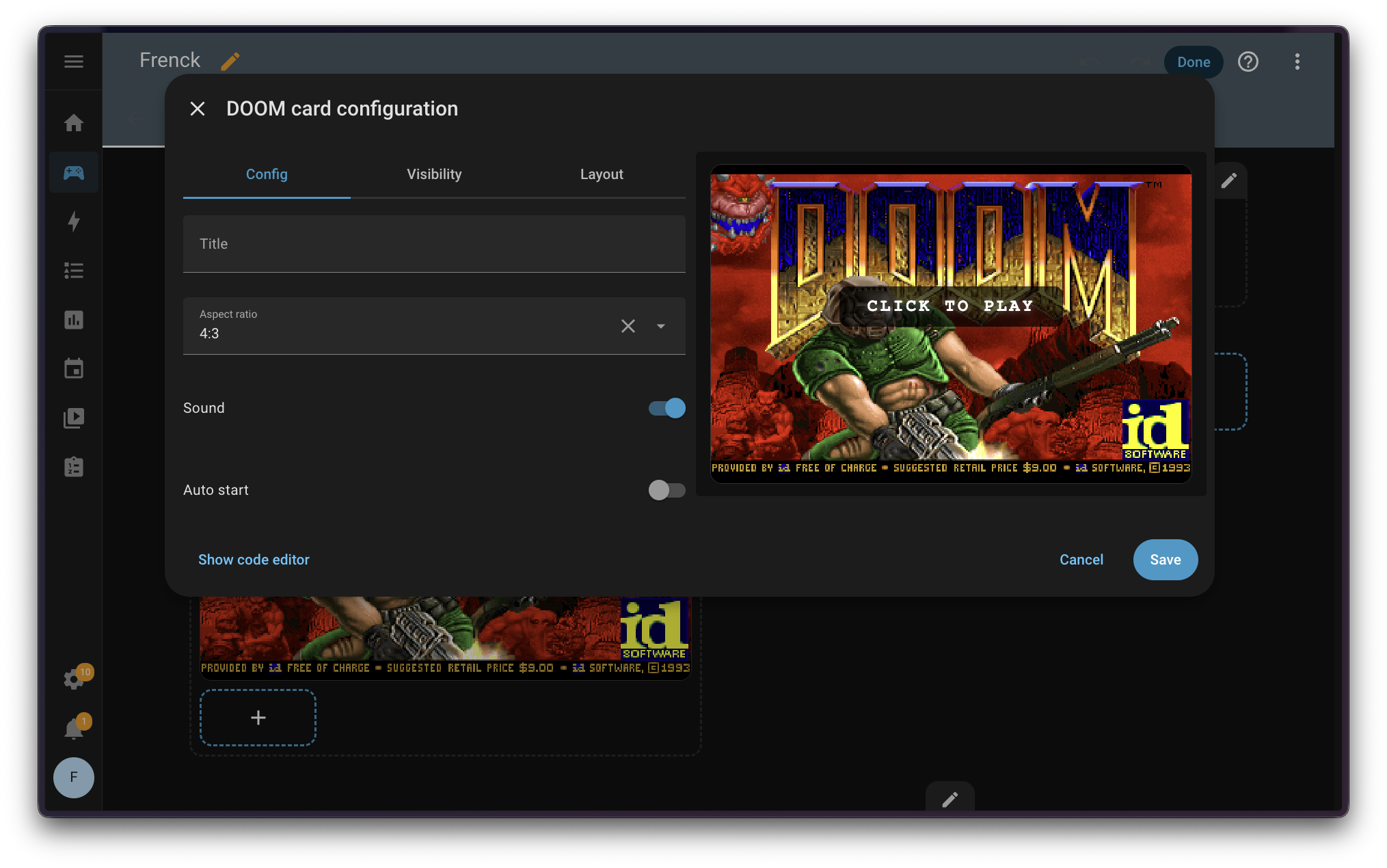
The card editor provides the following configuration options:
- Title: Optional card header title. No title is shown by default.
- Sound: Enable or disable sound output. On by default.
- Auto start: Start the game immediately without clicking to play. Off by default.
| Action | Key |
|---|---|
| Move forward | ↑ |
| Move backward | ↓ |
| Turn left | ← |
| Turn right | → |
| Strafe left | , |
| Strafe right | . |
| Fire | Ctrl |
| Use / Open | Space |
| Run | Shift |
| Strafe | Alt |
| Weapon select | 1-7 |
Note: A keyboard is recommended for the best experience.
The integration provides several entities, all grouped under a single DOOM device.
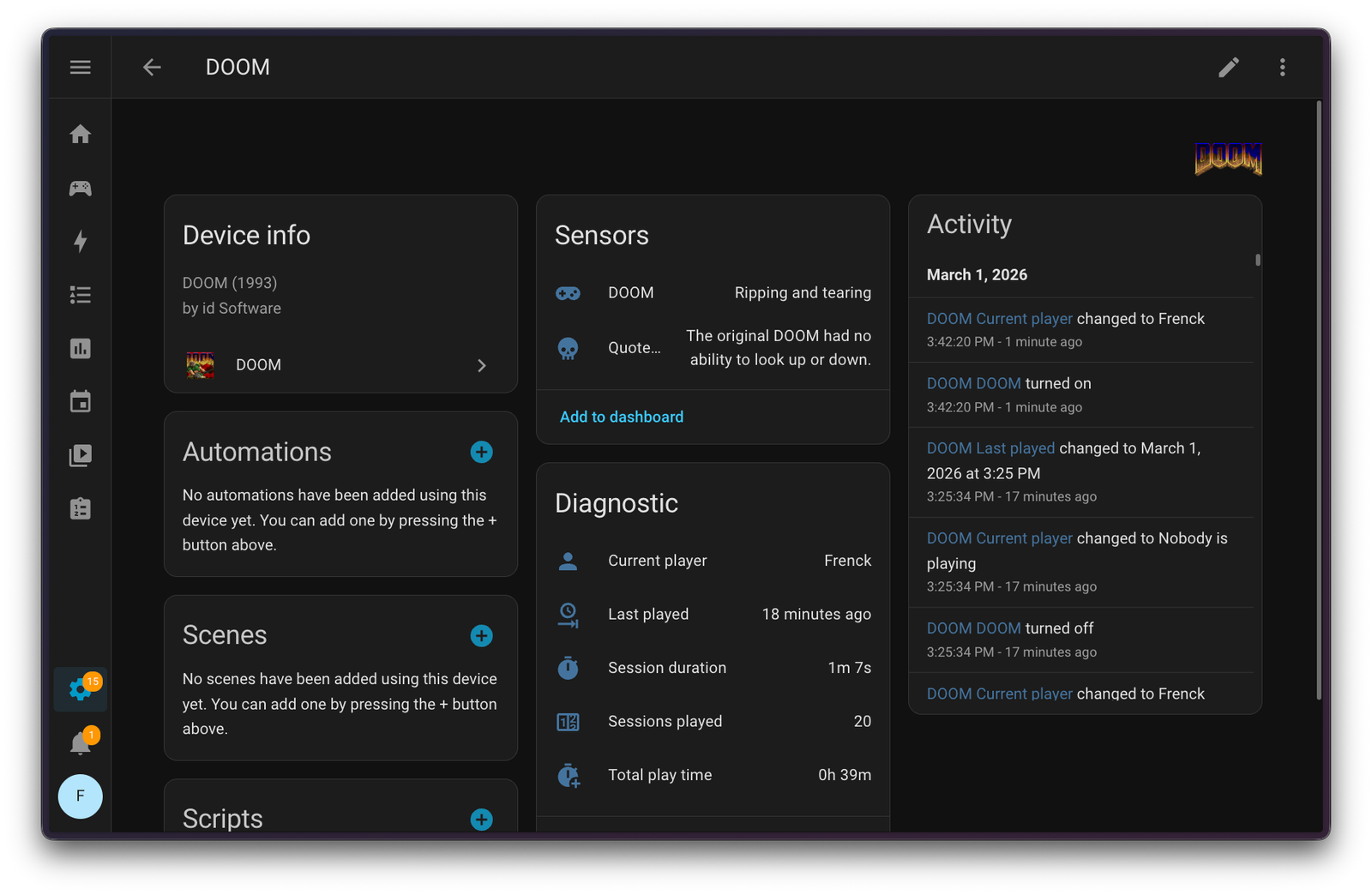
A binary sensor that tracks whether someone is actively playing DOOM on your Home Assistant instance. It uses a heartbeat mechanism: the dashboard card sends periodic pings while the game is running. If no ping is received within 3 seconds (or the page is closed), the sensor turns off.
| State | Label |
|---|---|
on |
Ripping and tearing 🔥 |
off |
Dormant 💤 |
An enum sensor that displays a random DOOM fact or quote. It updates once per day and picks from a pool of 46 facts covering the game's history, lore, development trivia, and iconic quotes.
Tracks which Home Assistant user is currently playing DOOM. When nobody is playing, the state is "Nobody is playing".
Shows the duration of the current (or last) DOOM session, displayed in minutes. Updates in real time with a 1-second tick while the game is running.
Tracks the cumulative time spent playing DOOM across all sessions, displayed in hours. This value persists across restarts.
A counter that increments each time a new DOOM session is started. This value persists across restarts.
A timestamp sensor that records when the last DOOM session ended.
True to Doom's legacy, this integration includes a hidden cheat code.
Type iddqd anywhere in the Home Assistant interface (yes, just start
typing it!) and a DOOM dialog will appear, letting you play the game
immediately, no dashboard card needed. God mode activated.
Set your office lights to a hellish red color scheme while playing DOOM, and restore them when you stop:
automation:
  - alias: "DOOM lights on"
    description: "Set office lights to DOOM colors when playing"
    triggers:
      - trigger: state
        entity_id: binary_sensor.doom
        to: "on"
    actions:
      - action: scene.create
        data:
          scene_id: doom_office_before
          snapshot_entities:
            - light.office
      - action: light.turn_on
        target:
          entity_id: light.office
        data:
          rgb_color: [200, 0, 0]
          brightness: 255

  - alias: "DOOM lights off"
    description: "Restore office lights when DOOM session ends"
    triggers:
      - trigger: state
        entity_id: binary_sensor.doom
        to: "off"
    actions:
      - action: scene.turn_on
        target:
          entity_id: scene.doom_office_before
Tip: Replace
light.officewith your own light entity IDs. You can add multiple lights tosnapshot_entitiesandtargetto cover an entire room.
DOOM is a registered trademark of id Software LLC. The shareware version of DOOM (DOOM1.WAD) is freely redistributable per id Software's original shareware distribution license. The full registered versions of DOOM and DOOM II require a separate purchase from id Software.
This project is not affiliated with or endorsed by id Software or ZeniMax Media.
This repository keeps a change log using GitHub's releases functionality. The format of the log is based on Keep a Changelog.
Releases are based on Semantic Versioning,
and use the format of MAJOR.MINOR.PATCH. In a nutshell, the version will be
incremented based on the following:
MAJOR: Incompatible or major changes.MINOR: Backwards-compatible new features and enhancements.PATCH: Backwards-compatible bugfixes and package updates.
This is an active open-source project. We are always open to people who want to use the code or contribute to it.
We've set up a separate document for our contribution guidelines.
Thank you for being involved! 😍
The original setup of this repository is by Franck Nijhof.
For a full list of all authors and contributors, check the contributor's page.
MIT License
Copyright (c) 2026 Franck Nijhof
Permission is hereby granted, free of charge, to any person obtaining a copy of this software and associated documentation files (the "Software"), to deal in the Software without restriction, including without limitation the rights to use, copy, modify, merge, publish, distribute, sublicense, and/or sell copies of the Software, and to permit persons to whom the Software is furnished to do so, subject to the following conditions:
The above copyright notice and this permission notice shall be included in all copies or substantial portions of the Software.
THE SOFTWARE IS PROVIDED "AS IS", WITHOUT WARRANTY OF ANY KIND, EXPRESS OR IMPLIED, INCLUDING BUT NOT LIMITED TO THE WARRANTIES OF MERCHANTABILITY, FITNESS FOR A PARTICULAR PURPOSE AND NONINFRINGEMENT. IN NO EVENT SHALL THE AUTHORS OR COPYRIGHT HOLDERS BE LIABLE FOR ANY CLAIM, DAMAGES OR OTHER LIABILITY, WHETHER IN AN ACTION OF CONTRACT, TORT OR OTHERWISE, ARISING FROM, OUT OF OR IN CONNECTION WITH THE SOFTWARE OR THE USE OR OTHER DEALINGS IN THE SOFTWARE.