

Browse every public Agent Skill (SKILL.md format) grouped by theme in a collapsible tree, tick several and install them in one go through npx skills add, without its interactive prompts. Skills already installed come pre-ticked: untick one to uninstall it.
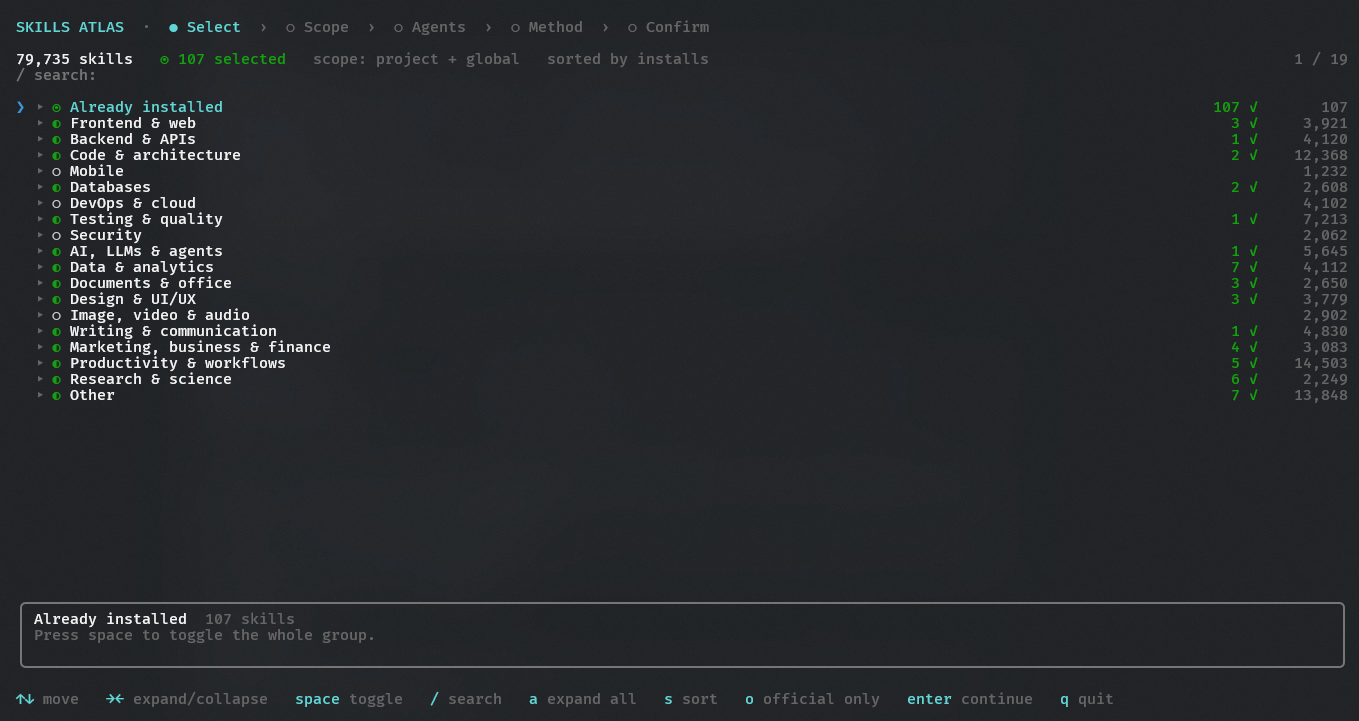
npx skills-atlas # or: npm i -g skills-atlasNode ≥ 20. A catalog snapshot ships inside the package, so it works offline; online, the CLI fetches the latest daily snapshot (see The catalog).
skills-atlas                                  # interactive: tree → scope → options → confirm
skills-atlas browse -t security -q audit      # tree pre-filtered by theme and text
skills-atlas browse -a claude-code cursor -g  # options given as flags are not asked; -g/-p also limits the tree to that scope
skills-atlas themes                           # themes and their skill counts
skills-atlas list -t databases -n 10          # non-interactive listing (--json available)
skills-atlas agents                           # ids accepted by --agent (★ = detected here)
skills-atlas install anthropics/skills@pdf supabase/agent-skills@supabase -a claude-code -p -y
skills-atlas ui                               # the same in your browser, with the mouse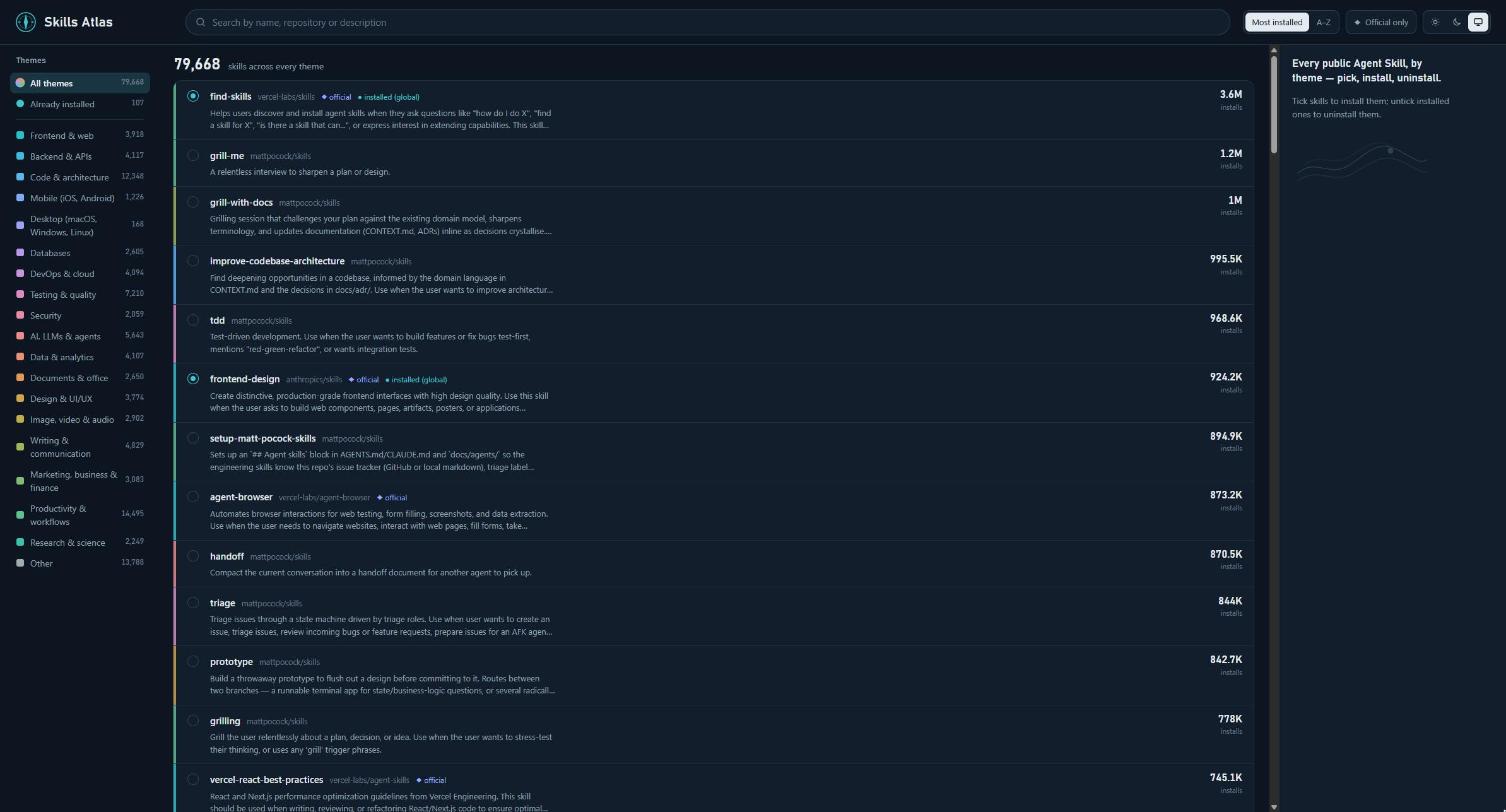
skills-atlas ui serves a local page and opens it in your browser: themes on the left, a search over the whole catalog, skills to tick (installed ones are ticked; untick to uninstall), then scope, agents and method on the right with the exact npx skills commands, and a live progress window once you apply. It runs the same code as the terminal (catalog, detection of installed skills, install commands) and remembers the same choices.
The server listens on 127.0.0.1 only. The address carries a random token (after the #, so it never leaves your browser) that every request must present, and requests from any other host name are refused, so no other web page can drive installs. Stop it with Ctrl+C.
| Option | Effect |
|---|---|
--port <n> |
port to listen on (default: 4747, or a free one if taken; a stable port lets the page remember its light/dark choice) |
--no-open |
print the address without opening the browser |
--catalog, --offline, --refresh, --skills-version |
as for browse |
The interface speaks English, French, Spanish, Brazilian Portuguese, German, Simplified Chinese, Japanese and Korean (en, fr, es, pt, de, zh, ja, ko). It follows your system language when it is one of these, and falls back to English:
skills-atlas -l fr                  # switch to French (or --lang fr): the choice is remembered
skills-atlas -l en                  # back to English
skills-atlas -l ja                  # 日本語 (es: español, pt: português, de: Deutsch, zh: 简体中文, ko: 한국어)
skills-atlas lang                   # current language
SKILLS_ATLAS_LANG=fr skills-atlas   # force a language from the environment, without saving it
The choice made with -l is saved in ~/.config/skills-atlas/config.json, so later runs keep it without the flag. Precedence: -l/--lang, then SKILLS_ATLAS_LANG, then the saved choice, then the system language (LC_ALL, LC_MESSAGES, LANG, or the OS locale on Windows), then English. Chinese, Japanese and Korean characters take two terminal columns; the tree measures them as such, so columns stay aligned. --theme accepts a theme id or its label in any language (security, Sécurité…).
Translations live in src/i18n/. Adding a language takes one file implementing the Messages type (TypeScript reports any missing key), one entry in LANGUAGES and its number locale in LOCALES; the tests check that every theme is translated. The Spanish, Portuguese, German, Chinese, Japanese and Korean translations have not been reviewed by native speakers yet: corrections are welcome.
skills-atlas reads what is installed in both scopes, the current project and your user profile, and opens the tree. With -p or -g it reads only that scope.
- Detection reads what the skills CLI writes on disk: the canonical
.agents/skillsdirectory, every agent's skills directory, and the lock file for sources. It gives the same result asnpx skills list --jsonin under a second instead of ~30 s. - Pre-ticked: installed skills are ticked and marked with their scope,
● project,● globalor● project + global, under their theme and in an Already installed group at the top. That group also holds skills the catalog does not know, such as home-made ones. - Uninstall: unticking an installed skill marks it
✗ will be uninstalled. On confirmation it is removed from every agent of every scope it was found in, with onenpx skills remove -s … -y [-g]per scope, then checked on disk. - Install: ticking a skill that is not installed installs it. The scope is asked after the tree, pre-filled with your last choice, unless
-p/-gsets it. - Questions: the status line shows the balance
+N −M. Scope, agents and method are only asked when there is something to install.
| Key | Action |
|---|---|
| ↑ ↓ / PgUp PgDn | move |
| → / ← | expand / collapse a theme |
| space | tick a skill, or a whole theme (unticking an installed skill uninstalls it) |
/ |
search (enter to keep, esc to clear) |
a |
expand / collapse all |
s |
sort: installs (default) ↔ name |
o |
only official skills (marked ◆) |
| enter | continue |
q |
quit |
The mouse works too: the wheel moves through the list, a click ticks a skill, opens a theme (or ticks the whole theme on its checkbox), and picks an answer in the next steps. The interface then runs on the terminal's alternate screen; hold Shift to select text, or start with --no-mouse to keep the normal screen.
| Option | Effect |
|---|---|
-a, --agent <ids...> |
target agents (claude-code, cursor, codex, github-copilot…; '*' = all) |
-g, --global / -p, --project |
scope: your user profile or the current project |
--copy / --symlink |
one copy per agent, or a symlink to .agents/skills |
-y, --yes |
no questions; --agent becomes required |
--dry-run |
print the npx skills commands without running them |
--no-mouse |
keyboard only: normal screen, native text selection |
--skills-version <v> |
skills CLI version (default: 1.7.0, pinned) |
--catalog <path|url> |
alternative catalog |
--offline |
do not download the latest catalog (also SKILLS_ATLAS_OFFLINE=1) |
--refresh |
check GitHub for a newer catalog now instead of waiting up to 12 hours (an unchanged one is not downloaded again) |
--all, --min-installs <n> |
include skills with no installs or stars / minimum installs |
-s, --sort <order> |
installs (default) or name; also for list |
--official |
only official skills; also for list and themes |
-l, --lang <code> |
interface language, remembered |
Any option left out is asked after the selection, pre-filled with your last choices (~/.config/skills-atlas/config.json) and the agents detected on the machine.
Selected skills are grouped per repository, and each repository gets one call:
npx -y skills@1.7.0 add <owner/repo> -s <skill…> -a <agent…> [-g] [--copy] -y --json
- The source comes first, because
-sand-atake every argument that follows them. -ais always passed. With-yalone, the skills CLI would install to every detected agent.- Results are read from
--json. Outside that mode, the skills CLI exits 0 even when an install fails. - Calls run one after the other, because they share the same lock file.
- Uninstalls run first, as a single
npx skills remove -s … -y [-g]call.
In a terminal, progress is shown uv-style: one line per task (uninstall, then one per repository) with a spinner, a bar that follows the steps skills add reports (fetching the repository, installing, security audit) and the elapsed time, an overall bar, then a + installed / - uninstalled / × failed summary. When the output is piped, or with --verbose, plain lines are printed instead.
data/catalog.json.gz is rebuilt every day by GitHub Actions (npm run crawl). The CLI downloads that snapshot from GitHub, keeps it in ~/.cache/skills-atlas/ (or $XDG_CACHE_HOME/skills-atlas/) and checks for a new one at most every 12 hours, with an ETag, so an unchanged catalog is not downloaded again. It uses the snapshot bundled in the npm package when that one is newer, when GitHub cannot be reached (it then waits an hour before trying again), or with --offline. --refresh skips the 12-hour wait; failing that, deleting ~/.cache/skills-atlas/ has the same effect on older versions. Changes to the catalog format must stay readable by released versions, which download it too.
The snapshot is built from:
| Source | Access | Provides |
|---|---|---|
| claude-plugins.dev | GET /api/skills?limit=100&offset=N, full listing |
~47,000 skills, descriptions, stars, installs |
| skills.sh | sitemaps (the 20,000 most installed skills, in order); optionally GET /api/search?owner= |
popularity rank; install counts for the top N owners (--max-owners N) |
| Smithery | registry.smithery.ai/skills, at most 500 results per query |
categories (Coding, Design, Security…) |
| GitHub | Trees API + raw.githubusercontent.com |
missing descriptions, read from SKILL.md |
| officialskills.sh | sitemap | official publishers: every skill whose GitHub owner is listed there is flagged official |
Rate limits. The skills.sh search API allows 30 requests per minute. The crawl queries it at that pace, about 2 s per owner. The daily workflow covers the top 600 owners; a local crawl covers none by default. With VERCEL_OIDC_TOKEN, the crawl uses the official API instead, which returns the full leaderboard.
Processing:
- Deduplication on
owner/repo@name, case-insensitive. - Encoding repair: claude-plugins.dev serves Chinese and Japanese text double-encoded in UTF-8.
- Missing descriptions (the 5,000 most popular skills):
- with
GITHUB_TOKENor aghsession, one Trees call per repository locates eachSKILL.md; - otherwise the crawl tries the usual locations.
- with
- Ordering: skills ranked by skills.sh first, in rank order; then the others by installs and stars.
Themes: each skill gets 1 or 2 of 17 themes (see src/catalog/taxonomy.ts), from:
- keywords found in its name (weight 3) and description (weight 1), including Chinese and Japanese ones;
- the Smithery or SkillsMP categories it carries, mapped to these themes.
npm run crawl                         # full crawl, about 5 min
npm run crawl -- --max-owners 300     # + skills.sh installs of the top 300 owners (about 11 min more)
npm run reclassify -- --sample other  # re-apply the taxonomy without crawling
npm run sync-agents -- --ref v1.7.0 # regenerate the agent list from vercel-labs/skillsnpm install
npm test # vitest
npm run typecheck
npm run dev # run the CLI from sources
npm run build # dist/cli.js