



This plugin offers a suite of features to help developers work more efficiently with the BandLab Android project.
This plugin is built for BandLab's internal Android project and is not distributed for external use. We've open-sourced it to demonstrate our approach to improving developer experience through IDE integration. Many features depend on BandLab-specific conventions, libraries, tools, and services.
For local setup, build commands, and testing guidance, see Contributing.
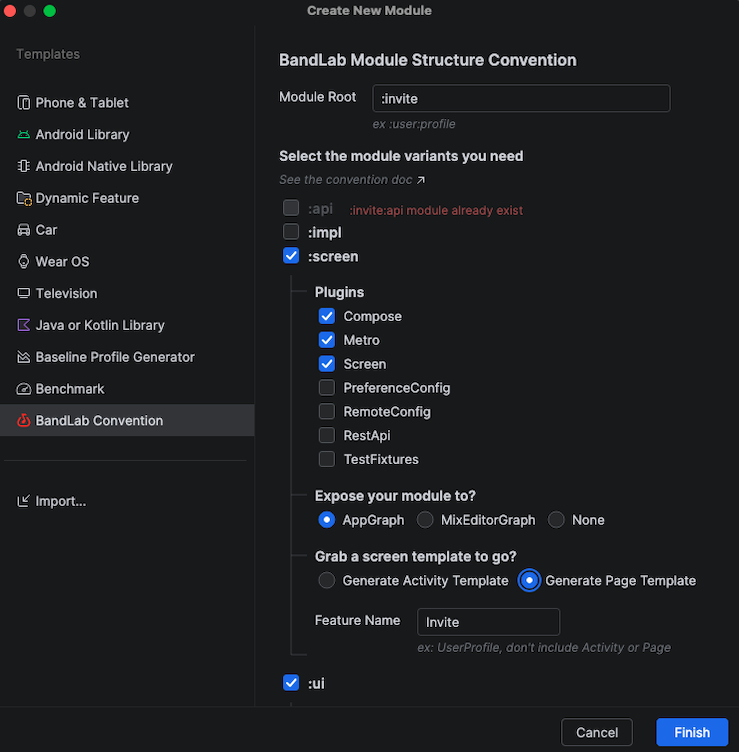
The UI is implemented using Jewel (Compose Desktop)! 🔮
- Create modules following BandLab Android conventions (:api, :impl, :ui, :screen).
- Support for batch creation of multiple modules.
- Contextual module path pre-filling and autocomplete.
- Optional
:impland:screenexposure toAppGraph(default) orMixEditorGraph. - Templates for Activities and Pages.
- Support adding modules to Spotlight, a partial IDE sync feature backed by
gradle/all-projects.txt.
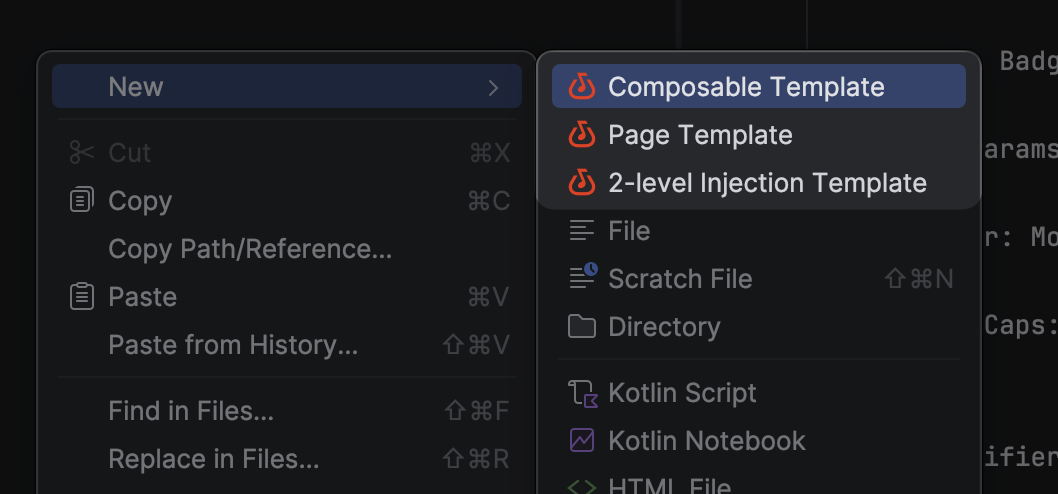
Generates Page and ViewModel.
Notes: Page is our internal framework to render a Composable with a given injected ViewModel type.
interface Page<ViewModel : Any> {

    @Composable
    fun Content(viewModel: ViewModel)
}Generates a Composable with a State class and Preview.
The example below fills in the generated state placeholders with a sample property. Imports are omitted; @ComposePreviewApi and @PreviewDayNight come from BandLab's internal UI toolkit.
@Immutable
data class ProfileHeaderState(
    val displayName: String,
) {
    companion object {
        @ComposePreviewApi
        fun preview(): ProfileHeaderState = ProfileHeaderState(
            displayName = "Alex",
        )
    }
}

@Composable
internal fun ProfileHeader(
    state: ProfileHeaderState,
    modifier: Modifier = Modifier,
) {

}

@PreviewDayNight
@Composable
private fun ProfileHeader_Preview() {
    ProfileHeader(
        state = ProfileHeaderState.preview(),
    )
}
Notes: @ComposePreviewApi marks preview-only APIs; our custom lint check prevents their use in production code.
Generates an interface and an impl for two-level injection.
Notes: Two-level injection is useful when you have both app-level and screen-level dependencies for a class whose dependencies you want to invert. In such cases, you can avoid manually passing screen-level dependencies. There are two factories: a screen-level factory and an app-level factory, like this:
interface FeatureViewModel {
    val state: FeatureState

    @Inject
    class Factory(
        private val coroutineScope: CoroutineScope,
        private val appLevelFactory: AppLevelFactory,
    ) {
        fun create(
            params: FeatureParams,
        ): FeatureViewModel = appLevelFactory.create(
            params = params,
            coroutineScope = coroutineScope
        )
    }

    interface AppLevelFactory {
        fun create(
            params: FeatureParams,
            coroutineScope: CoroutineScope,
        ): FeatureViewModel
    }
}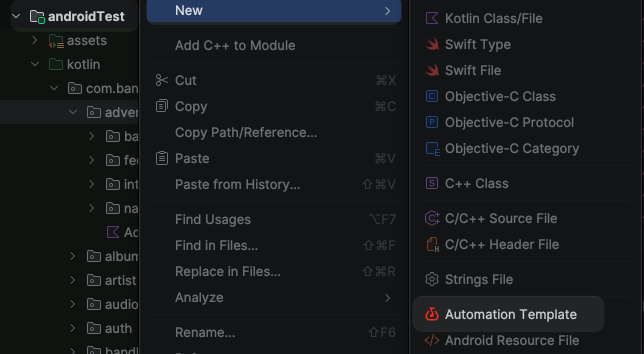
Generate Robot, Semantics, and Verifier templates following our automation conventions. Available only under the androidTest source set.
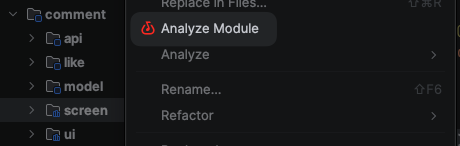
Right-click a module to analyze it using DAGP and our internal scoring plugin (predicts JVM module compatibility).
The plugin helps invoke these tasks in your IDE's Run tab:
- Android modules:
./gradlew :module:analyzeModule - Non-Android modules:
./gradlew :module:projectHealth
Trigger the Jenkins UI test build straight from the IDE, instead of opening Jenkins and filling in the parameters by hand.
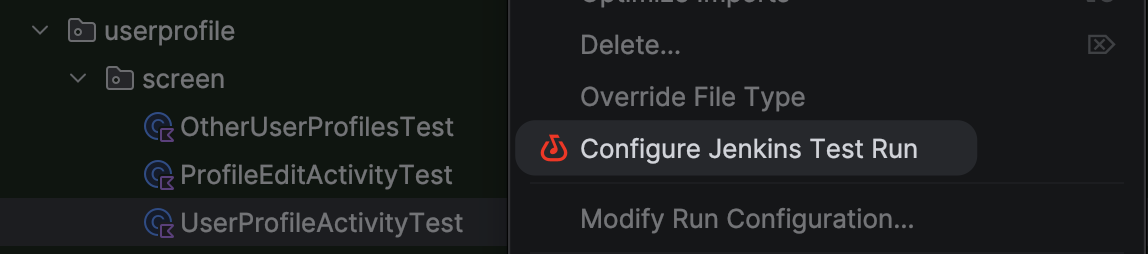
Right-click a Kotlin file under an Android test directory (src/androidTest/) that contains tests, and choose Configure Jenkins Test Run. A dialog opens where you build the run and send it.
- Pick tests with checkboxes. Test classes and their methods are shown as a tree — select a whole class or individual methods. The resulting
targetsJSON is shown live and can be copied.
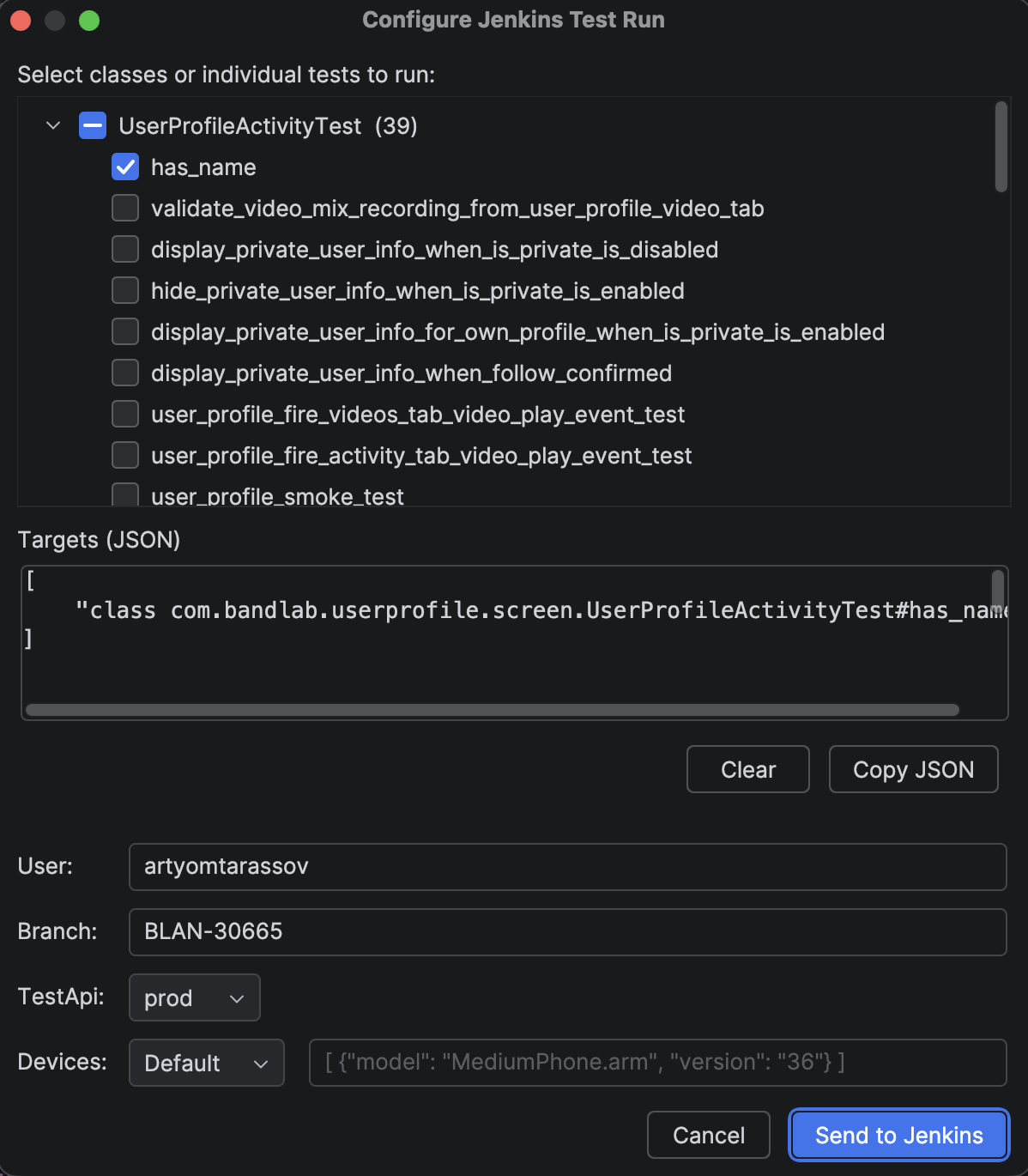
- Select across multiple files. Your selection is kept when you close the dialog, so you can open another test file and add more tests; everything accumulates into one
targetslist. Use Clear to reset it. - Smart defaults.
branchis pre-filled from the current Git branch.useris the GitHub owner of the remote tracked by that branch (the fork containing it); check the value if the branch has no upstream. - Device options. For
devices, choose Default to use the value configured on the Jenkins job, or Custom to provide your own JSON.
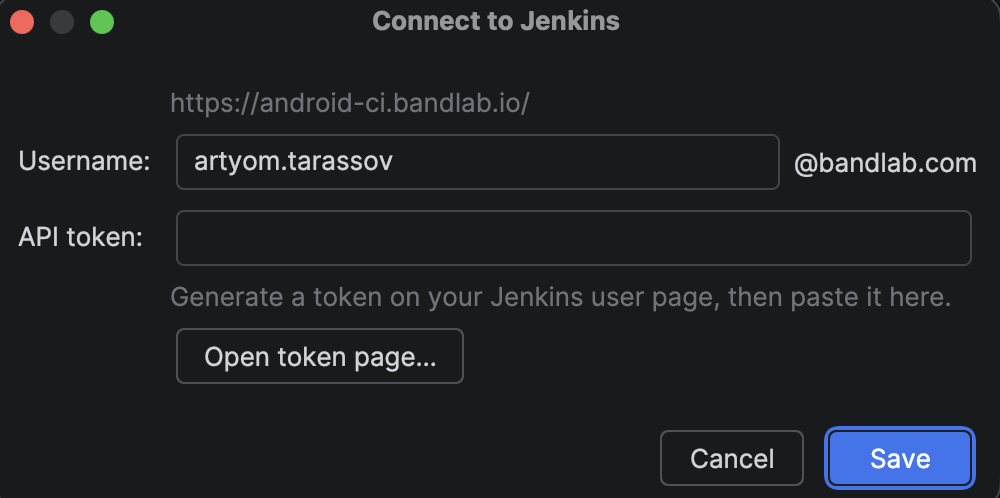
First-time setup. The first time you press Send to Jenkins, you're asked to connect: use Open token page… to generate a Jenkins API token (you're already signed in there via Google), paste it, and click Save. The username is pre-filled from your git config — update it if it doesn't match your Jenkins account. The token is stored securely in the IDE's password storage, so this is a one-time step.
After sending, a notification with an Open in Jenkins link points to the job page, where your new build appears at the top.
Add, update, and delete localization keys without hand-editing string resources — every action shells out to ./localizer/bandlab-localizer, which owns merging, validation, and multi-locale output. Available whenever localizer/bandlab-localizer-config.toml parses (no Gradle sync needed). Running an action also requires the Localizer executable and access to the configured Tolgee project.
Add a key that doesn't exist yet. On an unresolved reference (Strings.foo / R.string.foo), Alt+Enter → Localizer: Add string pulls it from Tolgee into the right module's file.
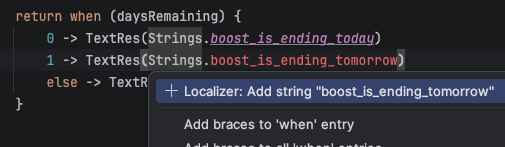
Update an existing key in place. On a defined Strings.foo / R.string.foo reference, Alt+Enter → Localizer: Update re-fetches just that key — no full re-sync.
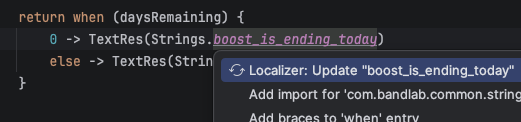
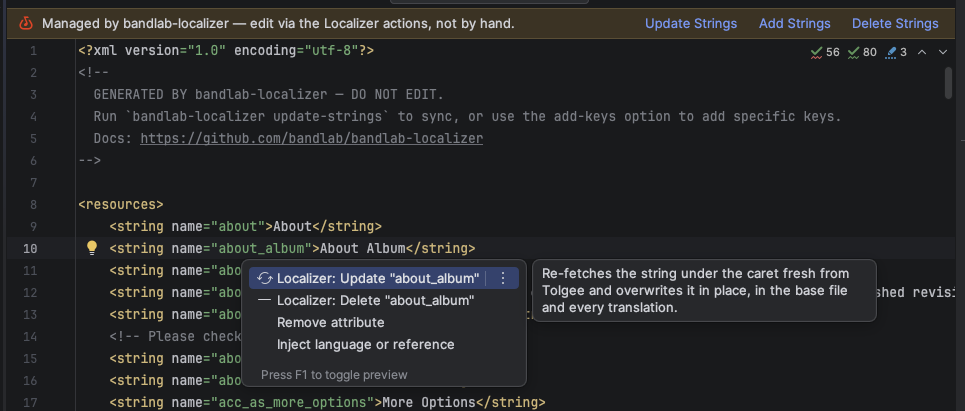
Work from the string file. Open a managed strings.xml / strings-plurals.xml: a banner links to the actions, and Alt+Enter on a <string> offers Update / Delete for that one key.
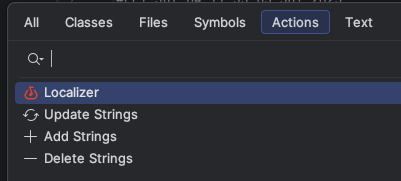
Run an action from anywhere. Find Action (or the Localizer menu) → Update / Add / Delete Strings, choosing the target file.
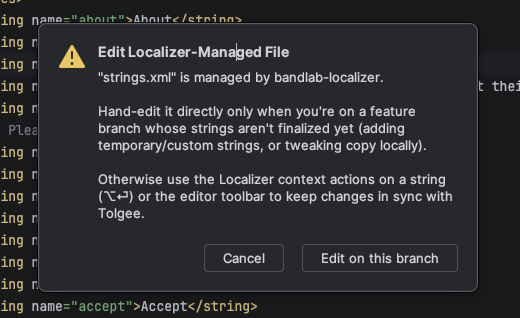
Hand-editing is gated, not blocked. Typing into a managed file prompts you to use the actions instead; choose Edit on this branch to proceed anyway (remembered per Git branch — e.g. a feature branch with un-finalized strings).
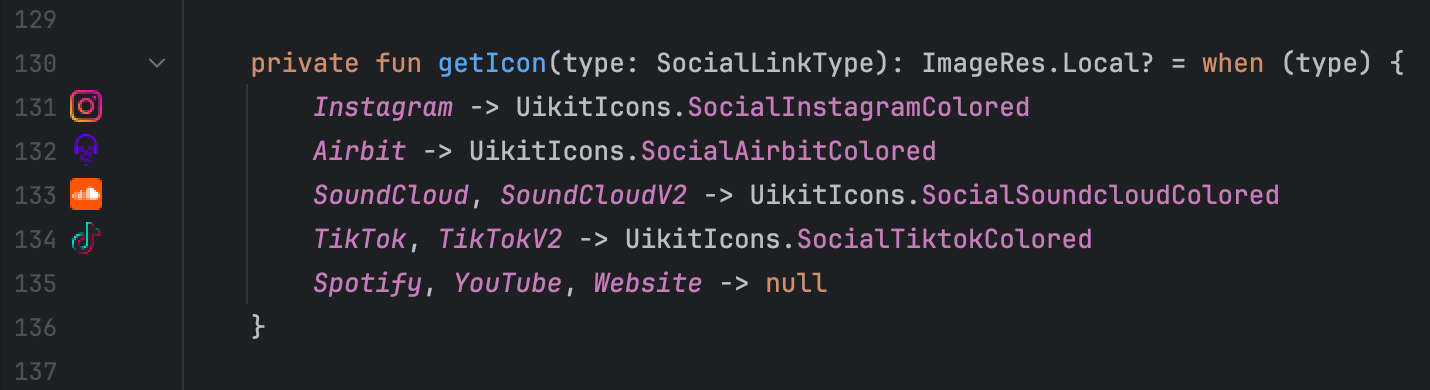
Shows the drawable icon inline in the editor gutter when referencing UikitIcons properties, including extension properties that delegate to UikitIcons.
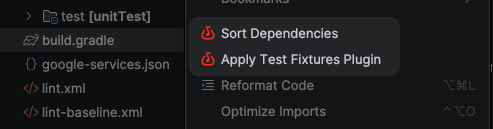
Right-click build.gradle or build.gradle.kts to sort plugins alphabetically and dependencies by configuration (api, implementation, testImplementation, ...), then alphabetically within each group. Comments are preserved. Uses the bundled gradle-dependencies-sorter CLI; no separate installation is needed.
Right-click build.gradle or build.gradle.kts to apply BandLab's Test Fixtures convention plugin and automatically create the required folders.
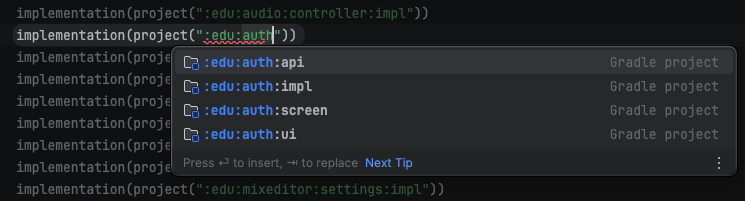
Since we avoid Gradle type-safe accessors, this plugin provides autocomplete and validation for project paths. Invalid paths are highlighted with a red underline.
Paths are read from gradle/all-projects.txt, with one Gradle project path (for example, :features:profile:api) per line; blank lines and # comments are ignored. This file is maintained by the Android project's tooling. Build scripts under gradle/ are excluded.
Acknowledgments: The feature was adapted from Slack foundry.
The BandLab Android project uses pre-commit.com hooks to enforce conventions on commit. To spare developers the manual pre-commit install setup (and installing the pre-commit binary itself), the plugin wires it up automatically. This plugin repository uses Kempt instead; see Contributing.
- Trigger — runs on project open (a
postStartupActivity), so every developer and fresh checkout gets it without any action. - Silent — no dialog or prompt. The install happens in a background task; a balloon appears only on success or failure.
- Idempotent & cheap — it reads
.git/hooks/pre-commitand returns immediately if the pre-commit.com hook is already there, so steady-state project opens pay only a single file read. It also no-ops unless the project has a.pre-commit-config.yaml. - Cross-platform — if the
pre-commitbinary is missing it's installed with the OS-appropriate toolchain (Homebrew on macOS, pipx on Windows/Linux), thenpre-commit installwires the hooks. All processes run with the captured login-shell environment, sobrew/pipxresolve even when the IDE is launched from the dock/Start menu.
Copyright 2026 BandLab Singapore Pte Ltd

Licensed under the Apache License, Version 2.0 (the "License");
you may not use this file except in compliance with the License.
You may obtain a copy of the License at

http://www.apache.org/licenses/LICENSE-2.0

Unless required by applicable law or agreed to in writing, software
distributed under the License is distributed on an "AS IS" BASIS,
WITHOUT WARRANTIES OR CONDITIONS OF ANY KIND, either express or implied.
See the License for the specific language governing permissions and
limitations under the License.
Plugin based on the IntelliJ Platform Plugin Template.