

A simple server application for Streaming Webcam Image via WebSocket.
As WSL2 still doesn't have simplified native support for using a Webcam, I decided to create this very basic C++ application for Windows and capture the Webcam signal via WebSocket in my OpenCV applications running on WSL2.
Now Mac (Apple Silicon) is also supported.
- Windows 7 or newer
- Git
- Visual Studio 2015 Update 3 or newer
The easiest way to build C and C++ applications on Windows is by using Visual Studio Community and VcPkg to manage the extensions.
- Install Visual Studio Community with C++ features.
- Clone VcPkg GitHub repository in a short path directory like 'C:\tools\vcpkg':
git clone https://github.com/microsoft/vcpkg.git C:\tools\vcpkg
- Run the VcPkg bootstrapping process:
cd C:\tools\vcpkg .\bootstrap-vcpkg.bat - Make all installed packages available to all VS projects:
vcpkg integrate install
vcpkg install opencv crow boost-program-optionsThere is no need for any additional configuration. Just build the application.
Go to the built application folder using the terminal then run the camera server:
.\webcam-ip.exeIt will use the default options.
Options:
--help: Show help
--port arg: Server port [default: 8080]
--camera arg: Windows Camera Index [default: 0]
Example:
.\webcam-ip.exe --port 8081 --camera 1Obtain the IP address of your host machine by running this command from your Linux distribution:
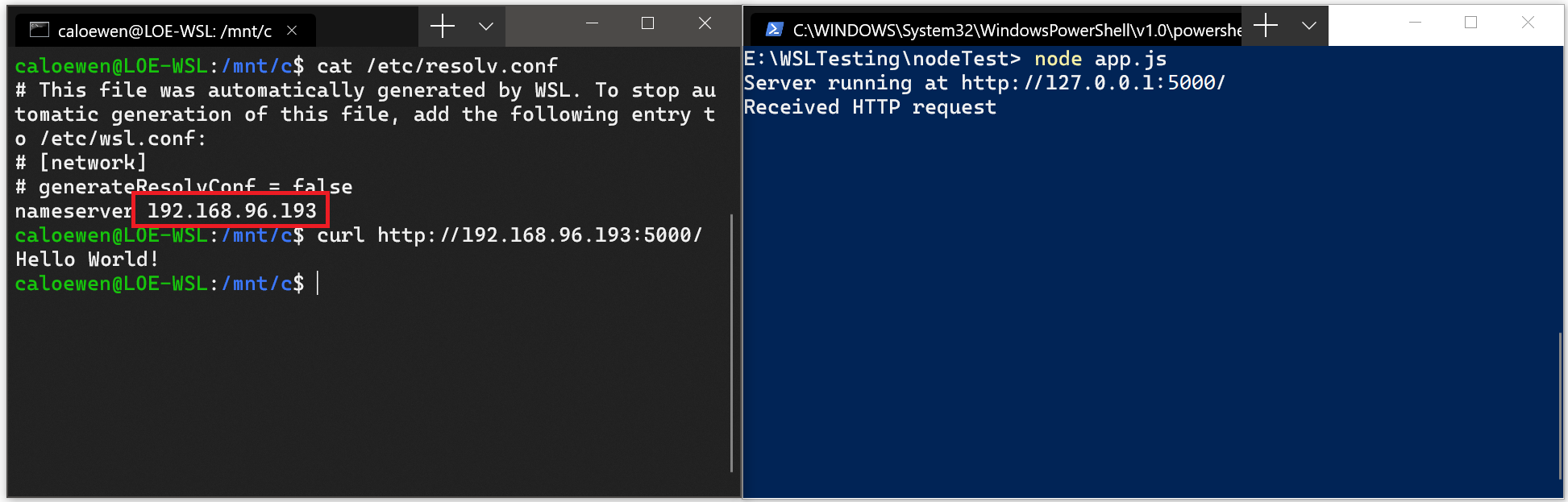
cat /etc/resolv.confCopy the IP address following the term: nameserver.
Connect to any Windows server using the copied IP address.
The picture below shows an example of this by connecting to a Node.js server running in Windows via curl.
- macOS (Apple Silicon) - Tested with Sonoma and M1 Pro Chip
- Git
- Homebrew
brew install cmake opencv boostFrom this project's root path:
mkdir build
cd build
cmake ..
makeGo to the built application folder using the terminal then run the camera server:
./webcam-ipIt will use the default options.
Options:
--help: Show help
--port arg: Server port [default: 8080]
--camera arg: Camera Index [default: 0]
Example:
./webcam-ip --port 8081 --camera 1With the server running, you can use the test clients to preview. In the folder examples there are application examples for the client in:
- HTML/JavaScript for an easy test (just open index.html)
- Python to run inside WSL2/Docker/another Linux machine in the same network.
The Python example applies a Grayscale filter to the received image from the server.
Change the SERVER_IP value in get_camera_streaming.py before running.
Change the port in the client if you change the default when running the server.
You will need the server running to test the client.