


Review what an npm dependency update gains access to.
capsurface scans dependency source and package scripts, compares them with a reviewed baseline, and explains new filesystem, network, process-execution and credential-access capabilities. Use it locally or in dependency-update PRs.
- Review in GitHub Actions: blocking reasons, source locations and npm dependency origins, with Markdown, JSON and SARIF output.
- Approve one installation: record a reason, bind approval to version and file content, and optionally set an expiration.
- Inspect published content before installation: scan local tarballs selected by an npm lockfile, verifying integrity without executing dependency code.
- Offline scanner, zero required dependencies: experimental
--deepanalysis uses optional, pinned Acorn and acorn-typescript parsers.
Early 0.x release. Static analysis is a review signal, not proof that a package is safe. Coverage limits are part of the tool's contract.
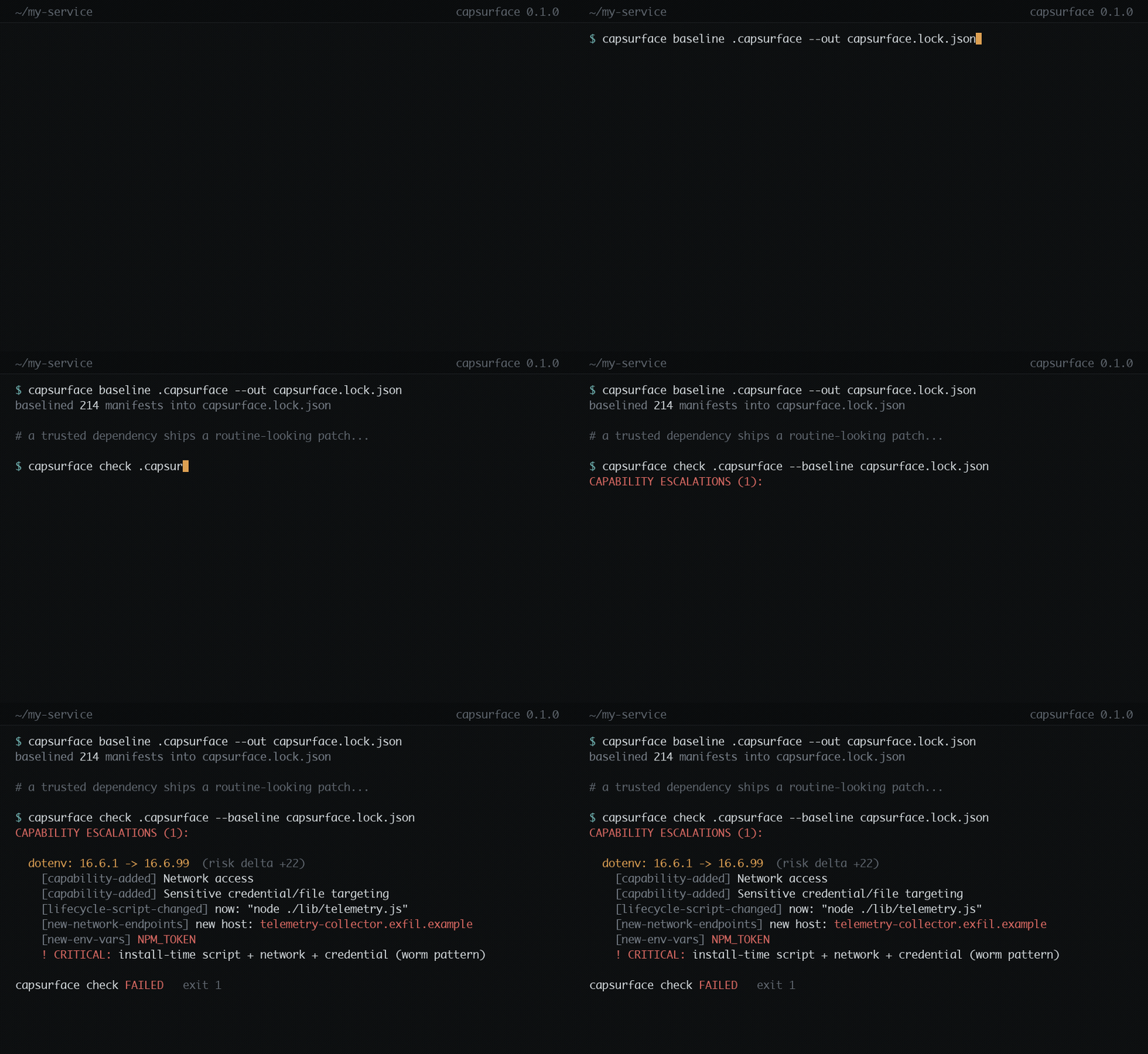
Illustrative terminal demo with a synthetic dependency change. The review example below includes source evidence and commands to reproduce the bundled fixture.
This is a condensed example from the repository's synthetic
handy-color-utils fixture, not a finding against a real npm package:
Dependency capability review
handy-color-utils: 2.3.0 → 2.3.1 — explicit review required
The capability check would fail.
| Added behavior or indicator | Evidence |
|---|---|
| Filesystem reads | scripts/setup.js:12 — fs.readFileSync(p, 'utf8') |
| Network access | scripts/setup.js:7 — require('https') |
| Process execution | scripts/setup.js:8 — require('child_process') |
| Credential targeting | scripts/setup.js:18 — process.env.HOME + '/.npmrc' |
| Install-time execution | package.json — new postinstall command |
These indicators explain why review is required; their co-occurrence does not prove that credentials are transmitted. Full reports retain separate evidence, coverage information and an ID for selective approval.
Try the bundled demo with Node.js and Bash; it scans the fixture source without running its payload:
git clone --branch v0.1.0 --depth 1 https://github.com/VictorMartins3/capsurface.git
cd capsurface
bash examples/run-demo.sh
The final check is expected to fail with exit 1; the demo itself succeeds when it observes that failure. The source fixtures and validation notes make the example inspectable.
Node.js >=14. No build step or mandatory parser installation.
npm install --global --ignore-scripts capsurface@0.1.0
capsurface --help
In the project being reviewed:
npm ci --ignore-scripts
capsurface scan-tree node_modules --out .capsurface/manifests
# Inspect the manifests before accepting the initial surface.
capsurface baseline .capsurface/manifests --out capsurface.lock.json
git add capsurface.lock.json
Creating a baseline records an approval; it does not establish that the starting version is benign. Keep dependency scripts disabled until review is complete.
For a later update:
npm ci --ignore-scripts
capsurface scan-tree node_modules --out .capsurface/manifests
capsurface review .capsurface/manifests --baseline capsurface.lock.json --out review.md
capsurface check .capsurface/manifests --baseline capsurface.lock.json --fail-on-new
review writes its report even when it returns 1 for a blocking change. Use the
review ID to accept one installation after examining its changes:
capsurface approve .capsurface/manifests --baseline capsurface.lock.json \
  --id <review-id> --reason "Reviewed the new HTTP client"
An approval covers the observed changes for that installation, not individual capability fields or every package in the tree. Commit the baseline diff with the dependency update. Review, content binding and expiration.
The Action writes a job summary and JSON/SARIF reports. It compares against the PR target's baseline even when the PR also updates approvals, then checks the proposed baseline separately. It does not post a PR comment.
After committing an initial baseline on the target branch, add this job to a
workflow triggered by pull_request:
permissions:
  contents: read

jobs:
  capability-review:
    runs-on: ubuntu-latest
    steps:
      - uses: actions/checkout@v4
        with:
          fetch-depth: 0
      - uses: actions/setup-node@v4
        with:
          node-version: 22
      - run: npm ci --ignore-scripts
      - uses: VictorMartins3/capsurface@922cae3e776b6e2a7460f1aec16c68a04673f948 # v0.1.0
        with:
          fail-on-new: 'true'
          report-only: 'true'
Start in observation mode, inspect the findings, then set report-only: 'false'
to enforce approvals. Invalid or incomplete Action scans still fail. Reports
stay in the job summary unless artifact/SARIF upload is explicitly enabled.
See the complete workflow for permissions
and options, including experimental deep: 'true'.
The Action runs its own scanner checkout. For custom CI or npm scripts, invoke
a trusted installation by absolute path so a project-local executable cannot
shadow it: node /absolute/path/to/capsurface/bin/capsurface.js.
| Task | Command or guide |
|---|---|
| Scan one package | capsurface scan node_modules/some-pkg --out manifest.json |
| Compare two manifests | capsurface diff before.json after.json |
| Explain who introduced a dependency | Add --lockfile package-lock.json to review |
| Export SARIF | Add --format sarif --out review.sarif to review |
| Review local published archives | scan-lock with npm lockfile v2/v3 |
| Resolve supported loader aliases and typed source | Experimental --deep |
| Inspect filesystem read/write/removal detail | Filesystem operations |
| Inspect shell/direct process launches | Process launch modes |
| Inspect network operations and bulk environment access | Environment and network operations |
capsurface allowlist .capsurface/manifests emits a candidate npm script
allowlist; --format pnpm emits onlyBuiltDependencies, and --format json
provides structured output. Check compatibility with your package-manager
version and review entries before applying them. An older script approval does
not approve an updated package's contents.
Keep .capsurface-snapshot with each manifest directory. It records scan
completion and excludes stale files. Do not commit generated reports or scans;
the reviewed capsurface.lock.json is the intentional versioned input.
- The default engine uses source-text heuristics. Deep mode adds bounded AST analysis; neither is sound or complete. Computed runtime behavior, obfuscation and unsupported syntax can produce misses or coverage failures.
- Capabilities describe source indicators, not executed behavior. File correlation and installation import paths do not establish data flow.
- Scan commands exit 2 on incomplete coverage. Incomplete input cannot be approved. Basic and deep profiles, engine changes and tarball/installed origins require compatible baselines; see migration and coverage.
- Source scans cover supported JS/TS extensions and package scripts, including source under test/docs directories. They do not analyze arbitrary binary payloads, native behavior or IDE execution hooks. Content hashes are separate from capability detection.
- Tree scans support nested npm installs, workspaces and pnpm stores within the
project boundary. Yarn Plug'n'Play needs a
node_moduleslayout. Tarball scans require local archives and reject unsupported inputs, including workspace links, Git/local dependencies and bundled dependency trees. - New packages fail only with
--fail-on-new. Informational changes remain visible; not every observed capability or endpoint blocks the gate.
capsurface adds a baseline comparison to dependency review. It complements advisory scanners, registry monitoring and runtime isolation; it does not replace them. Measurements and prior art describe the inputs, results and limitations without claiming universal detection accuracy or superiority over other tools.
Plain CommonJS, no build step. Run npm test, npm run test:integration and
npm run demo; tests require Node >=18. Optional-parser setup and contribution
rules are in CONTRIBUTING.md.
Report vulnerabilities using SECURITY.md. See CHANGELOG.md for user-facing changes and RELEASING.md for the release process.
MIT — LICENSE.