



A Chrome extension that turns a long ChatGPT or Claude.ai conversation into a navigable outline in the browser side panel.
link: https://chromewebstore.google.com/detail/ai-chat-timeline/ekjdciljnpfpolompiflnlglkooabpbg
What makes it different: most chat navigators index only your questions. This one also
parses the h1–h3 headings inside each assistant reply, so a 40-message conversation
becomes a two-level table of contents you can jump around — not just a list of prompts.
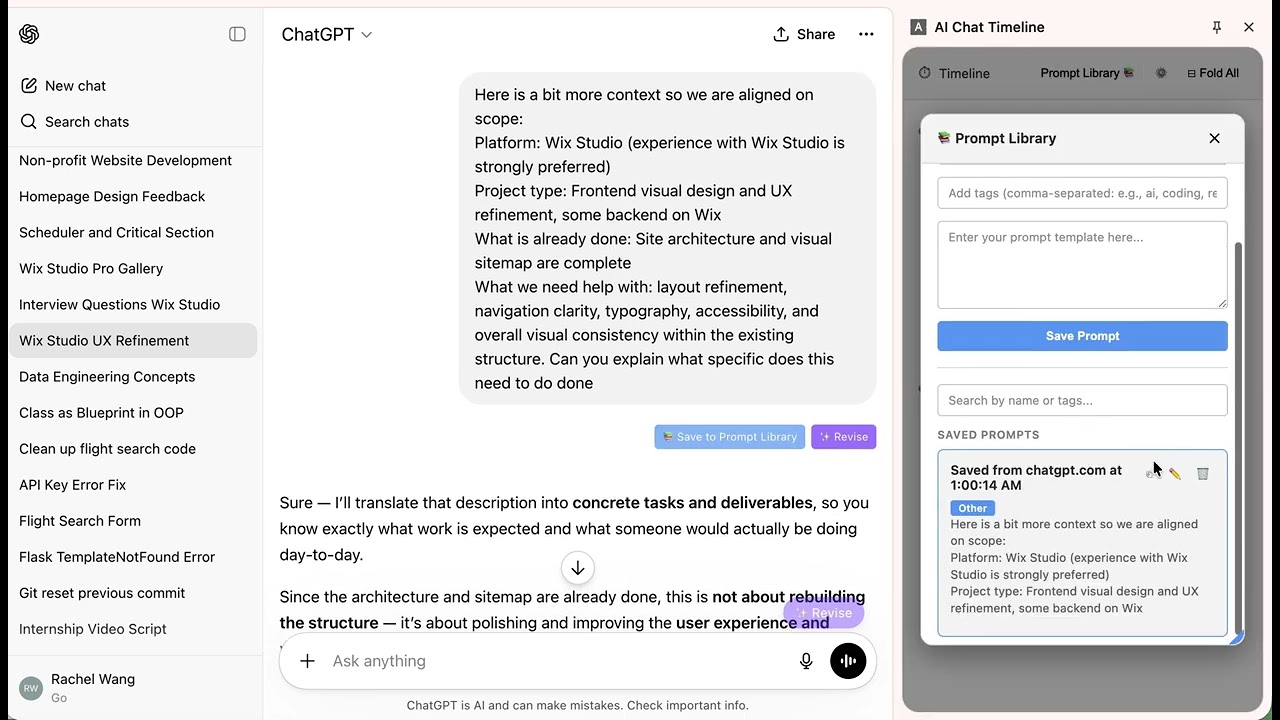
Timeline navigation
- Parses conversation turns in real time and renders them in order
- One click jumps to any user turn or assistant heading
- Highlights the anchor you are currently reading as you scroll
- Per-turn collapse (
▾ / ▸) and global⊟ Fold All / ⊞ Unfold All - Pin important anchors to a sticky area at the top
Prompt utilities
- Save to Prompt Library button injected into your own message bubbles
- ✨ Revise button on a message, rewriting the prompt through the Anthropic API
- ✨ Draft Revise floating button above the composer, on both platforms
Prompt Library
- Create, edit, copy, and delete prompts, with categories, tags, and keyword search
Other
- Context usage bar estimating how much of the model's context window the conversation fills
- Light / dark / system theme
No build step — the repository is the extension.
- Clone this repository.
- Open
chrome://extensions/and enable Developer mode. - Click Load unpacked and select the project folder.
- Open
chatgpt.comorclaude.ai, then click the extension icon to open the side panel.
To use Revise, add an Anthropic API key under Settings → Revise Settings in the side
panel. Requests are proxied through the service worker (background.js) to avoid the content
page's CSP; the key is stored in chrome.storage.local and never leaves the browser except
to api.anthropic.com.
The interesting problem here is not parsing the DOM — it is scrolling reliably on top of a
virtualized React list that unmounts the element you are trying to scroll to.
docs/ARCHITECTURE.md covers the data flow, the message protocol, and
why scrollEngine positions arithmetically instead of calling scrollIntoView().
| Layer | Choice |
|---|---|
| Extension API | Chrome Manifest V3 |
| UI | Vanilla JS — no framework, no bundler, no build step |
| Persistence | chrome.storage.local |
| AI | Anthropic API, proxied through the service worker |
| Tests | Node's built-in node:test + jsdom |
File structure
├── manifest.json                    # Extension config and permissions
├── background.js                    # Service worker: side panel, tab events, API proxy
├── content.js                       # Entry point: bootstraps the content/ module tree
├── content/
│   ├── index.js                     # Wires modules together, registers message listeners
│   ├── chatgptFetchInterceptor.js   # MAIN-world fetch hook for the full conversation payload
│   ├── adapters/
│   │   ├── adapterFactory.js        # Hostname -> platform adapter
│   │   ├── chatgptAdapter.js        # ChatGPT DOM parsing
│   │   ├── claudeAdapter.js         # Claude.ai DOM parsing
│   │   ├── claudeConversationApi.js # Claude.ai conversation API (full transcript)
│   │   └── claudeTranscript.js      # API transcript <-> virtualized rows, seek-to-mount
│   ├── timeline/
│   │   ├── parser.js                # Parsed turns -> TimelineTurn[]
│   │   ├── anchorManager.js         # anchorId -> the live DOM node
│   │   ├── scrollEngine.js          # The single scrolling authority
│   │   ├── scrollTracker.js         # IntersectionObserver -> active anchor
│   │   ├── tokenEstimator.js        # Heuristic context-usage estimate
│   │   └── timelineController.js    # Orchestrates parse -> send -> observe
│   ├── revise/
│   │   ├── promptBuilder.js         # Builds the revision prompt
│   │   ├── reviseController.js      # Orchestrates the revise flow
│   │   └── reviseService.js         # Sends REVISE_VIA_API to the service worker
│   ├── state/store.js               # Shared mutable state
│   ├── ui/                          # Injected buttons and modals
│   └── utils/                       # Logger and shared constants
├── panel/                           # Side panel: markup, styles, rendering
└── tests/                           # node:test suite
npm install
npm test
48 tests covering the pure modules: timeline parsing, the context-window token estimator, the revise prompt builder, adapter resolution, and Claude DOM parsing under jsdom. They run on every push and pull request via GitHub Actions.
OAuth credentials are stored outside the repository in
~/.config/ai-chat-timeline-extension/. The upload command builds a ZIP from runtime files,
refreshes the OAuth access token, and uploads a new draft:
npm run webstore:status
npm run webstore:upload
The command intentionally does not submit the draft for review or publish it.
- Draft Revise → "Use in Composer" does not work on Claude.ai. Claude's composer is a
ProseMirror editor, which ignores the
execCommand-based insertion the extension uses. Use the Copy button and paste manually. ChatGPT is unaffected. - The context usage bar is a heuristic estimate, not a tokenizer. It is deliberately conservative — it over-counts rather than under-counts.
- Bookmark (cross-platform conversation saving)
- Enter key handling (newline vs. submit toggle)
- Copy LaTeX
-
Use in Composersupport on Claude.ai via synthetic ProseMirror events