
A fine transparent desktop clock with blinking separator, scale, theme, and time-format settings for Novadesk.




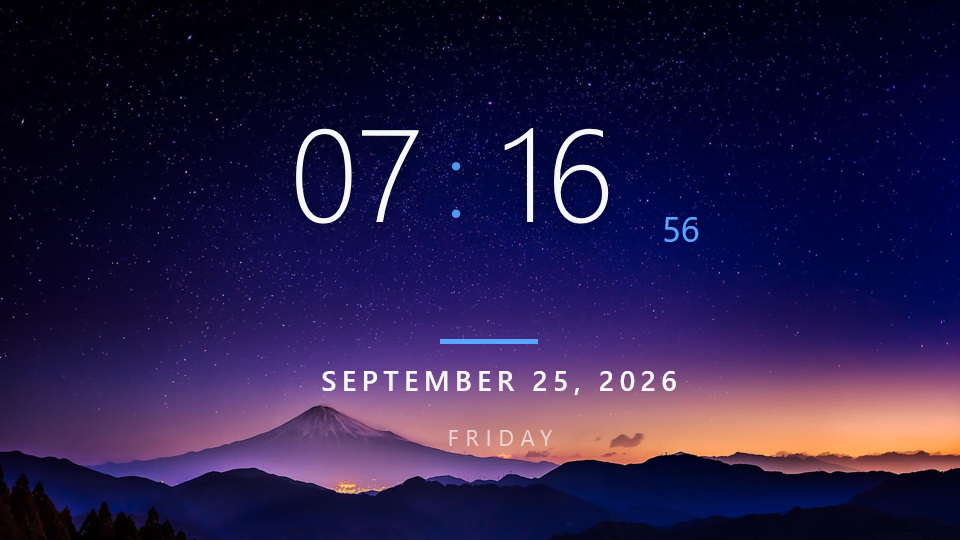
FineTime is a transparent, fine-grained desktop clock widget built for Novadesk. It presents a large hour and minute display alongside a live seconds counter, a full date line, the current weekday, and a continuously animated colon separator, all floating over your desktop with no background.
The widget includes:
- Large Clock Display: Renders hours and minutes in a light-weight Segoe UI font with proportional drop shadows, centered on the widget canvas.
- Animated Blinking Colon: The colon separator fades in and out using a smooth sine-eased animation rather than a hard on/off blink.
- Live Seconds Counter: A smaller seconds label updates every second alongside the main clock.
- AM/PM Badge: Shown automatically when 12-hour format is active; hidden in 24-hour mode.
- Accent Rule: A short colored bar sits between the clock and the date section as a visual divider.
- Full Date and Weekday: Displays the full month name, day, and year (e.g. SEPTEMBER 21, 2026) and the full weekday name (e.g. MONDAY) in spaced-out uppercase lettering.
- 12H / 24H Time Format: Toggle between 12-hour format (with AM/PM) and 24-hour format from the right-click menu.
- Light and Dark Themes: Light theme uses near-black text on a transparent background; Dark theme uses near-white text. Both use a colored blue accent.
- Adjustable UI Scaling: Scales the entire widget from 0.75X to 2X, resizing text, shadows, spacing, and the window itself proportionally.
- Right-Click Context Menu: Access Scale, Theme, and Time Format settings instantly without a separate settings window.
- Instant Startup Rendering: Reads persisted settings synchronously before the first frame to avoid any visible jump on load.
- Persistent Settings: Scale, theme, and time format are saved to Novadesk storage and restored automatically on every launch.
- Windows 10 or later
- Novadesk (v0.9.11.0 or higher)
Download the latest widget package (.ndpkg) from the project releases:
Double-click the downloaded .ndpkg file to install it directly with Novadesk. Novadesk must be installed before opening the package.
Clone or download this folder, then start it through the Novadesk Widget Manager:
cd D:\Novadesk-Project\FineTime
nwm run
The project entry point is index.js. If your Novadesk executable is in a different location, use the Widget Manager configuration or start Novadesk with this file as its script.
Right-click the widget to open the context menu and access the following options:
| Option | Values | Description |
|---|---|---|
| Scale | 0.75X, 1X, 1.25X, 1.5X, 1.75X, 2X | Resizes the widget window and all elements proportionally |
| Theme | Light, Dark | Switches between near-black text (Light) and near-white text (Dark) |
| Time Format | 12 Hour, 24 Hour | Toggles between 12H (with AM/PM badge) and 24H display |
All settings are saved automatically to Novadesk storage (app.storage) and restored the next time the widget launches.
If FineTime is useful to you, supporting the project on Patreon helps cover the time spent maintaining widgets, adding new features, and testing new Novadesk releases. Support is optional, but it makes continued work on the project possible.
FineTime is licensed under the Apache License 2.0.