Find visible UI bugs before your users do.
LayoutScope is an open-source CLI and GitHub Action. Give it a web page URL or local HTML, and it opens that page in Chromium at desktop and mobile sizes, checks 10 types of measurable UI defects, and produces an interactive report with annotated screenshots.
No approved reference screenshots. No AI API. Run it locally after a frontend change, or use it as a CI gate before merging.
English | 简体中文


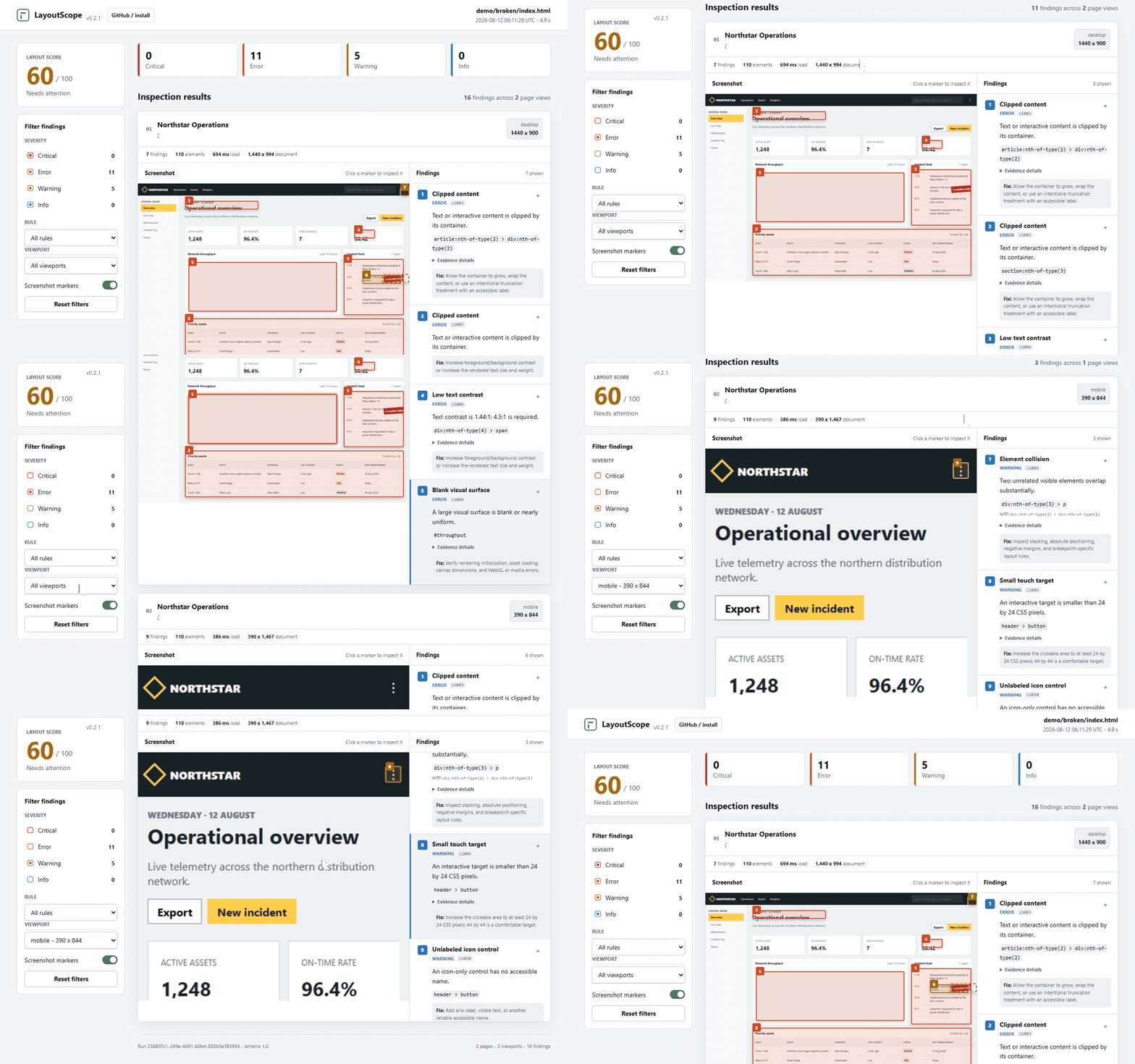
This report comes from an intentionally broken demo page. Select a finding to see the affected element, exact measurements, and screenshot annotation.
LayoutScope accepts an HTTP(S) URL, a local HTML file, a file:// URL, or a
directory containing index.html. It renders the routes and viewport sizes you
request, then checks the page state that exists after loading.
URL or local HTML
  -> Chromium renders each requested route and viewport
  -> deterministic checks inspect DOM, geometry, pixels, and accessible names
  -> annotated HTML report + JSON + SARIF + CI exit code
It catches overlap, clipping, horizontal overflow, broken or distorted images, blank canvas and video surfaces, weak text contrast, undersized touch targets, and unnamed icon controls. Every finding includes the responsible selector and measured evidence so a developer or coding agent can trace it back to source.
LayoutScope does not crawl an entire site, click through user flows, judge
visual taste, or compare pixels with a known-good screenshot. Use --path,
--ready, --wait, and Playwright storage state to scan the exact routes and
loaded page states that matter to you.
LayoutScope requires Node.js 20 or newer and a Chromium-compatible browser. It uses a supported Chrome or Edge installation automatically when available. If no browser is found, install Playwright Chromium once:
npx --yes --package github:LyraZeta/layoutscope#v0.4.0 playwright-core install chromiumStart your app, then scan it:
npx --yes github:LyraZeta/layoutscope#v0.4.0 http://localhost:3000By default, LayoutScope scans the page at desktop (1440x900) and mobile
(390x844) sizes. It opens .layoutscope/report.html when the scan finishes
and writes this report bundle:
report.html          Interactive HTML report
report.json          Stable machine-readable schema
report.sarif.json    GitHub Code Scanning compatible output
screenshots/         Raw and annotated screenshots used by the report
Keep report.html and screenshots/ together when sharing or archiving the
report. Every HTML report includes an English / 简体中文 switch; the selected
language is remembered locally, and Chinese-language browsers default to
Simplified Chinese.
The default failure threshold is error: the report is still generated, but
the command returns exit code 1 when a finding reaches that severity. Use
--fail-on never while exploring. Configuration, browser, baseline, and scan
errors return exit code 2.
Scan a local HTML file or a directory containing index.html:
npx --yes github:LyraZeta/layoutscope#v0.4.0 ./dist/index.htmlScan specific routes and viewport sizes:
npx --yes github:LyraZeta/layoutscope#v0.4.0 http://localhost:3000 \
  --path / --path /pricing --path /dashboard \
--viewport desktop --viewport mobile --viewport 768x1024:tablet| Rule | Finding | Evidence |
|---|---|---|
LS001 |
Horizontal document overflow | viewport and document widths, responsible element |
LS002 |
Element escaping the viewport | exact escaped edges and geometry |
LS003 |
Clipped text or interactive content | client and scroll dimensions |
LS004 |
Substantial collision between unrelated elements | both selectors, overlap area and ratio |
LS005 |
Touch target below 24 x 24 CSS pixels | rendered target size |
LS006 |
Text below WCAG AA contrast | foreground, background, font size, measured ratio |
LS007 |
Broken visible image | resolved image source |
LS008 |
Distorted image aspect ratio | intrinsic and rendered dimensions |
LS009 |
Blank canvas or video surface | sampled pixel spread and dominant-color ratio |
LS010 |
Unnamed icon-only control | selector, role, and rendered geometry |
Every rule is deterministic and runs locally. LayoutScope understands modern CSS color spaces and open Shadow DOM; it does not send screenshots, HTML, or page content to an external service. Touch-target checks run only for touch or mobile-sized viewports, and pixel-dependent rules skip cases where backgrounds, filters, cross-origin media, or transparency make a reliable result impossible. The rules are deliberately conservative and do not replace a full accessibility audit, interaction test suite, or cross-browser review.
After your app server is listening in the same GitHub Actions job, scan its loopback URL with the LayoutScope Action:
- uses: LyraZeta/layoutscope@v0.4.0
  with:
    target: http://127.0.0.1:3000
The Action targets GitHub.com ubuntu-latest runners. It installs Chromium,
runs the scan, fails at error severity by default, and always uploads the report
bundle. For safety, it does not auto-discover JavaScript or TypeScript config
from the caller workspace. Pass config: explicitly to load a
layoutscope.config.ts, .js, or .json file.
For complete copy-paste workflows, see the Vite, Next.js, and static-site GitHub Actions recipes.
LayoutScope exits non-zero when an error is found by default:
npx --yes github:LyraZeta/layoutscope#v0.4.0 http://127.0.0.1:3000 --no-open --fail-on errorChoose a threshold:
npx --yes github:LyraZeta/layoutscope#v0.4.0 ./site --fail-on critical
npx --yes github:LyraZeta/layoutscope#v0.4.0 ./site --fail-on warning
npx --yes github:LyraZeta/layoutscope#v0.4.0 ./site --fail-on never
Authenticated page:
npx --yes github:LyraZeta/layoutscope#v0.4.0 https://app.example.com/dashboard \
  --storage-state ./playwright/.auth/user.json \
  --ready '[data-dashboard-ready]'
Manual GitHub Actions steps:
- run: npx --yes --package github:LyraZeta/layoutscope#v0.4.0 playwright-core install --with-deps chromium
- run: npx --yes github:LyraZeta/layoutscope#v0.4.0 http://127.0.0.1:3000 --no-open
- uses: actions/upload-artifact@v7
  if: always()
  with:
    name: layoutscope-report
    path: .layoutscope/
Upload report.sarif.json with github/codeql-action/upload-sarif to surface findings in Code Scanning.
Adopt LayoutScope without fixing the entire existing backlog first. Save a normal JSON report from the main branch, then compare the pull request against that report:
# Main branch inventory: detection itself still needs no reference screenshot.
npx --yes github:LyraZeta/layoutscope#v0.4.0 http://127.0.0.1:3000 \
  --output .layoutscope-main --no-open --fail-on never

# Pull request gate: fail only when a new finding meets the threshold.
npx --yes github:LyraZeta/layoutscope#v0.4.0 http://127.0.0.1:3000 \
  --compare .layoutscope-main/report.json --output .layoutscope-pr --no-open
Comparison mode matches deterministic findings by route, viewport, rule, and
fingerprint. Terminal output focuses on new findings, while report.json
retains the complete current scan plus new, existing, and resolved
groups. The HTML and SARIF reports include the same comparison counts. Use the
same paths, viewports, and config on both runs for a meaningful comparison.
The Action exposes the same option:
- uses: LyraZeta/layoutscope@v0.4.0
  with:
    target: http://127.0.0.1:3000
    compare: .layoutscope-main/report.json
See the pull-request baseline recipe for a complete workflow that stores the latest successful main-branch report as a GitHub Actions artifact.
Create layoutscope.config.ts, .js, or .json when a deterministic finding
has been reviewed and accepted. Every suppression requires a rule, a reason,
and at least one exact matcher; combine matchers to keep the scope narrow.
export default {
  suppressions: [
    {
      rule: "LS006",
      selector: ".legacy-login-hint",
      path: "/login",
      viewport: "mobile",
      reason: "Tracked in UI-142; remove after the login redesign.",
    },
  ],
};
Use a finding's fingerprint from report.json for the narrowest stable
match. Suppressed findings do not affect the score or failure threshold, but
remain visible in report.json, the HTML suppression audit, and SARIF run
metadata. Unused entries are shown with a zero match count so stale exceptions
can be removed. Pass --config <path> to use a non-default filename.
LayoutScope found a reproducible contrast issue in the public react-admin demo: the 16px login hint rendered at 2.68:1 against white, below the required 4.5:1. The finding led to marmelab/react-admin#11340, a one-token fix from text.disabled to text.secondary.

Read the full reproducible case study to see the scan command, measured evidence, source token, and fix. This is the workflow LayoutScope is built for: scan a current page, inspect measured evidence, trace it to source, and offer a small upstream fix without first creating a screenshot baseline.
Add a visual completion gate to AGENTS.md, CLAUDE.md, or your agent instructions:
After user-facing frontend changes, run LayoutScope against every changed route
at desktop and mobile sizes. Do not declare the task complete while critical or
error findings remain. Preserve the HTML report when a finding needs review.
The command is deterministic and local, so an agent can inspect the JSON evidence, change the UI, and rerun the same check without sending page content to a model API.
layoutscope <target> [options]

-c, --config <path>           Config file; auto-detects layoutscope.config.*
    --no-auto-config          Disable automatic config discovery
    --compare <report.json>    Compare findings with an earlier JSON report
-o, --output <directory>       Report directory (default: .layoutscope)
-v, --viewport <viewport>      desktop, mobile, tablet, wide, or WIDTHxHEIGHT
-p, --path <path>              Route to scan; repeatable
    --wait <milliseconds>       Extra wait after DOM load (default: 250)
    --ready <selector>          Wait for a visible element before scanning
    --storage-state <path>      Playwright authentication state
    --browser <channel>         chrome or msedge
    --executable-path <path>    Chromium-compatible browser executable
    --max-findings <count>      Cap findings per rule and page view
    --include-info              Include informational findings
    --fail-on <severity>        critical, error, warning, info, or never
    --format <format>           text or json
    --report-title <title>      HTML report title
    --report-description <text> HTML report description metadata
    --canonical-url <url>       Canonical URL for a hosted HTML report
    --social-image-url <url>    Social preview image URL for a hosted report
    --no-open                   Do not open the HTML report
| Approach | Needs a baseline | Needs an API key | Finds geometry bugs | Gives pixel/DOM evidence |
|---|---|---|---|---|
| Screenshot diffing | Yes | No | Only after a known-good image | Pixel diff only |
| Vision-model review | No | Usually | Sometimes | Model explanation |
| Accessibility audit | No | No | Limited | Accessibility tree / DOM |
| LayoutScope | No | No | Yes | Screenshot + selectors + measurements |
LayoutScope complements Playwright assertions, screenshot testing, and axe-core. It catches a different class of failures: visible layout problems that can be inferred from the current rendered page without an approved reference image.
- Report the responsible container instead of every clipped descendant.
- Ignore intentional horizontal scrollers and explicit ellipsis/line-clamp patterns.
- Require substantial overlap and suspicious positioning before reporting a collision.
- Skip contrast checks when layered images, filters, or transparency make a deterministic answer unreliable.
- Attach measurements to every finding so false positives are debuggable.
There will still be edge cases. A minimal reproduction in an issue is the fastest way to improve a rule.
pnpm install
pnpm exec playwright-core install chromium
pnpm check
pnpm build
pnpm demo
The demo intentionally contains responsive overflow, clipped content, a collision, low contrast, a blank canvas, and a small mobile control.
- Native GitHub pull-request summaries and annotations
- Inline suppression comments for fixture-heavy projects
- Multi-page discovery from a sitemap
- Fixed/sticky occlusion and focus-ring clipping rules
- Browser matrix support
- VS Code report viewer
Contributions, rule proposals, and real-world false-positive fixtures are welcome. See CONTRIBUTING.md.
MIT