
© M. Jagadeeswar Reddy 2025. All Rights Reserved.
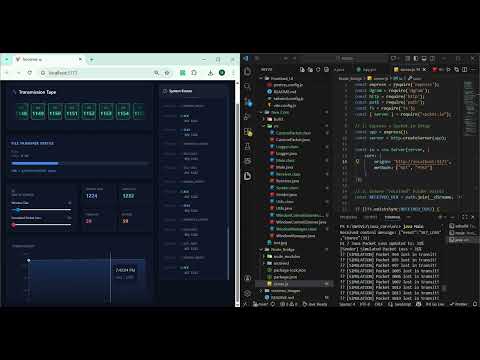
New Features: Image/PDF support, Real-time Preview, Packet Loss Simulation, and Dynamic Window Resizing.


Original version demonstrating text-based packet simulation.

NetViz Pro is an advanced full-stack Network Simulator that implements a Binary-Safe Reliable Transport Protocol over UDP.
Unlike the basic version (v1.0), v2.0 supports real file transfers (Images, PDFs, etc.) and simulates real-world network conditions like packet loss and dynamic window resizing. It visualizes the entire lifecycle of a file transfer—from binary segmentation to reconstruction—on a real-time dashboard.
This project integrates:
- Java → Core ARQ Engine (File I/O & Logic)
- Node.js → UDP → WebSocket Bridge
- React (Vite) + TailwindCSS → Visualization/UI
- Recharts + Lucide → Real-time telemetry
A custom protocol combining the best of Go-Back-N + Selective Repeat:
- Supports out-of-order packet reception
- Uses cumulative ACKs (like TCP)
- Retransmits only missing packets
- Timeout detection + retry logic
- FIN handshake for session closing
- Checksum-based integrity validation
- Packet segmentation + reconstruction
This design provides: ✔ High throughput ✔ Simplified ACK logic ✔ More realistic behavior ✔ Easier visualization
The core engine has been upgraded to support arbitrary file types (loaded via backend configuration, rather than UI drag-and-drop):
- Metadata Injection: The first packet (Seq 0) carries the Filename and File Size.
- Binary Segmentation: Reads files byte-by-byte (not string-based) to ensure data integrity for images/PDFs.
- Automatic Reconstruction: The Receiver parses metadata, streams chunks to a buffer, and saves the file to disk upon completion.
- Live Preview: The dashboard displays the received image immediately upon completion.
The UI animates every network event:
- Packet Sent → Flying animation
- ACK Received → Green flash
- Timeout → Shake animation
- Retransmission → Bounce animation
- Current sliding window → Blue highlight box
Plus graphs:
- Throughput chart (SEQ vs. Time)
- Metrics dashboard (Sent, ACKs, Timeouts, Retries)
- Live log stream with timestamps
The dashboard allows real-time manipulation of the protocol:
- Window Size Slider: Dynamically resize the TCP Window (1-500) during transmission using UDP control packets.
- Packet Loss Simulator: Introduce artificial packet loss (0-50%) to observe retransmission behavior and window stalling.
- Playback Control: Pause, Resume, and Reset the visualization timeline.
A lightweight middleware relays Java events to the UI with zero delay:
| Java Event | Purpose |
|---|---|
FILE_START |
Initial metadata event (filename, size) |
PACKET_SENT |
Packet transmitted |
ACK_RECEIVED |
ACK processed |
TIMEOUT |
Packet assumed lost |
RETRANSMIT |
Missing packet resent |
WINDOW_MOVED |
Sender's window advanced |
FILE_COMPLETE |
File saved and ready for preview |
Ports:
- UDP 5000 → Node receives events
- WebSocket 3000 → Frontend listens live
┌──────────────────┐       UDP:5000         ┌─────────────────────┐        WS:3000         ┌──────────────────────┐
│   Java ARQ Core  │  ─────────────────►  │      Node Bridge      │  ─────────────────►   │      React Dashboard     │
│ (Sender/Receiver) │                      │ (Static File Server)  │                      │ (File Preview UI)      │
└──────────────────┘  ◄──────────────────  └─────────────────────┘  ◄──────────────────  └──────────────────────┘
        ▲    │                                     ▲                                              │
        │    └─► Writes to 'received/' ────────────┘                                              │
        │                                                                                         │
        │  1. Metadata (Seq 0)           2. Binary Data Chunks           3. FIN (End of File)     │
        │  [Flag|NameLen|Name|Size]      [Raw Bytes.........]            [Type: FIN]              │
🧩 Technology Stack
Frontend
React (Vite)

TailwindCSS

Recharts (graphs)

Lucide Icons

Custom CSS Physics Animations

Middleware
Node.js

Express.js

Socket.IO

UDP Sockets (dgram)

Core Networking Engine
Java (JDK 17+)

Java NIO (FileChannel/ByteBuffer)

Custom ARQ protocol implementation

Manual packet framing + checksum

Byte-level packet handling

📁 Project Structure
Plaintext

NetViz/
│
├── Java_Core/              # Core ARQ Protocol
│   └── src/
│       ├── Sender.java
│       ├── Receiver.java
│       ├── WindowManager.java
│       ├── WindowControlListener.java  # Listens for UI Slider events
│       ├── Logger.java
│       ├── CustomPacket.java
│       ├── Utils.java
│       └── Main.java
│
├── Node_Bridge/            # UDP → WebSocket Bridge
│   ├── server.js
│   ├── received/           # Stores transferred files
│   └── package.json
│
└── Frontend_UI/            # Visualization Layer (React + Tailwind)
    ├── src/
    │   ├── App.jsx
    │   ├── index.css
    │   └── main.jsx
    ├── index.html
    └── package.json
🛠 How to Run the Project
1️⃣ Start Node Bridge
Listens for logs and serves the received files for preview.

Bash

cd NetViz/Node_Bridge
node server.js
Output: ✅ UDP Bridge listening... 📡 Serving received files...

2️⃣ Start the React Dashboard
Launches the visualization interface.

Bash

cd NetViz/Frontend_UI
npm install
npm run dev
Open the dashboard at: http://localhost:5173

3️⃣ Run Java ARQ Protocol
Make sure you have a test file (e.g., test.png) referenced correctly in Main.java.

Bash

cd NetViz/Java_Core/src
javac *.java
java Main
Example output:

Plaintext

SENDER STARTED FILE TRANSMISSION
[SENDER] Sending File: test.png
...
FIN sent
Receiver ACKed FIN
✅ Saved file to: .../Node_Bridge/received/test.png
Meanwhile, the dashboard visualizes:

Packet movement

ACK waves

Timeout pulses

Window sliding

Real-time file progress bar & image preview

📬 Contact
Built by M. Jagadeeswar Reddy.