Repository navigation
Dealing with Directions
The Direction class defines the set of 8 directions (UP, UP_RIGHT, RIGHT, DOWN_RIGHT, DOWN, DOWN_LEFT, LEFT, and UP_LEFT, as well as a 9th direction NONE) and defines what their delta-x and delta-y values are. This defines the "coordinate plane" that is being used to represent the grid. It also provides various utility functions related to directions/grid operations.
- Table of Contents
- Code Examples
- Retrieving a Direction
- Coordinate Plane in Terms of Directions
- Operations on Directions
- Directions as Primitive Types
- Utility
Code examples in this section show only code in the Main function. The code provided assumes that the following "using" statements are at the top of the code file:
using GoRogue;The Direction class cannot be instantiated -- instead, the Direction class itself provides static members representing all possible directions on a grid. We can retrieve these by simply accessing these members.
System.Console.WriteLine(Direction.UP); // Prints UP
System.Console.WriteLine(Direction.DOWN); // Prints DOWNEach direction as a DeltaX and DeltaY property, which defines the change in x and y values that occur when some coordinate is "moved" by 1 grid position in that direction. The DeltaX and DeltaY values define where the coordinate plane's origin resides. This is particularly relevant when considering different origins used in computer graphics applications.
In standard computer graphics applications, including many roguelike/ascii display libraries, y-values increase as we proceed downward from the origin. This implies that the DOWN direction (or any direction with a downward component) has a positive DeltaY value, while the UP direction (or any direction with an upward component) has a negative DeltaY value:
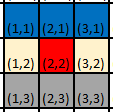
The red square represents an arbitrary starting location. Notice that the blue squares, representing locations adjacent in the directions UP_LEFT, UP, and UP_RIGHT, have a smaller y-value than the starting location, whereas the grey squares, representing locations adjacent in the DOWN_LEFT, DOWN, and DOWN_RIGHT directions, have larger y-value than the starting point.
In a more standard mathematical coordinate plane, y-values increase as we progress upward from the origin. This implies that directions with a upward component have a positive DeltaY value, while directions with a downward component have a negative DeltaY value:
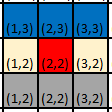
Again, the red location represents an arbitrary starting location. The blue squares, depicting adjacent squares in the UP_LEFT, UP, and UP_RIGHT directions, have a larger y-value than the starting location this time, while the grey squares, depicting those adjacent in the DOWN_LEFT, DOWN, and DOWN_RIGHT directions, have a smaller y-value than the starting location.
This coordinate plane is used as the basis for "scene coordinates" in many visual game libraries such as Unity.
Because both of these coordinate planes are so common, GoRogue provides the functionality to "modify" the DeltaX and DeltaY properties of its Direction instances. This is accomplished using the Direction.YIncreaseUpward boolean property. It defaults to false. When set to false, the coordinate plane is set to define the Standard Screen Coordinates coordinate plane, where y-values decrease upwards, and increase downwards. When set to true, the coordinate plane defines the Standard Mathematical Coordinates coordinate plane, where y-values decrease downwards and increase upwards:
Direction.YIncreasesUpward = false; // This is the default if the value is never set

// Standard Screen Coordinates
System.Console.WriteLine($"DeltaX and DeltaY for UP: ({Direction.UP.DeltaX}, {Direction.UP.DeltaY})");
System.Console.WriteLine($"DeltaX and DeltaY for DOWN: ({Direction.DOWN.DeltaX}, {Direction.DOWN.DeltaY})");


System.Console.WriteLine("\nFlipping YIncreasesUpward to true...");
Direction.YIncreasesUpward = true;

// Standard Mathematical Coordinates
System.Console.WriteLine($"DeltaX and DeltaY for UP: ({Direction.UP.DeltaX}, {Direction.UP.DeltaY})");
System.Console.WriteLine($"DeltaX and DeltaY for DOWN: ({Direction.DOWN.DeltaX}, {Direction.DOWN.DeltaY})");
The setting of the YIncreasesUpwards flag also affects the output of any function that bases its output on Directions (for example, Coord.BearingOfLine or Direction.GetDirection).
The intent is that most games would only use one type of coordinate plane -- thus, this variable would be set once when the program is created. One must use caution if the flag is changed mid-program -- this is viable, however any direction indices that are stored in long-term variables will NOT be updated. For this reason, GoRogue avoids doing so internally.
Direction provides numerous operators to assist with common functions.
Given a direction, we can "turn right", eg. get the next clockwise direction, or "turn left", eg. get the next counter-clockwise direction, by using the addition/subtraction operators of Direction:
Direction d = Direction.UP;
d++; // d is now the next clockwise direction, eg. Direction.UP_RIGHT
System.Console.WriteLine(d);
d--; // d is now the next counter-clockwise direction, eg. Direction.UP
System.Console.WriteLine(d);

// d is now 2 directions clockwise, aka the next cardinal direction,
// since d was cardinal.  d will be Direction.RIGHT
d += 2;
System.Console.WriteLine(d);
// d is now 2 directions counter-clockwise, aka the next cardinal direction,
// since d was cardinal.  d will be Direction.UP
d -= 2;
System.Console.WriteLine(d);
The addition and subtraction operators wrap around appropriately, so we may add/subtract arbitrary numbers:
Direction d = Direction.UP;

// Adding 8 wraps around to exactly where we started. Thus, adding 10
// yields a direction 2 clockwise of the starting direction.  Thus
// d becomes Direction.RIGHT.
d += 10;
System.Console.WriteLine(d);
// Similarly, subtracting 8 yields the starting direction. so subtracting
// 9 gets a direction one counter-clockwise from the start.  Thus,
// d becomes Direction.UP_RIGHT.
d -= 9;
System.Console.WriteLine(d);
Adding or subtracting any amount from Direction.NONE yields Direction.NONE:
System.Console.WriteLine("Direction.NONE + 100 is " + (Direction.NONE + 100));
System.Console.WriteLine("Direction.NONE - 27 is " + (Direction.NONE - 27));There are also addition operators provided that can interact with Coords. We can "move" a Coord in a specific Direction using the addition operator:
Coord start = Coord.Get(1, 3);
// By default, UP has a negative DeltaY value -- thus this yields the Coord (1, 2)
System.Console.WriteLine($"Directly UP from {start}, we have {start + Direction.UP}");

// Changing the YIncreasesUpward flag results in Direction.UP having a
// positive DeltaY, so the Coord we get back reflects this change.
Direction.YIncreasesUpward = true;
// Yields the Coord (1, 4).
System.Console.WriteLine($"After changing YIncreasesUpward, directly UP from {start}, we have {start + Direction.UP}");Because Direction is not an enum or primitive type, it would normally be impossible (prior to C# 7), for example, to use a Direction in a switch statement. However, because the Direction cannot be instantiated, and all needed Directions are instantiated internally within GoRogue code (thus the number of Direction instances is constant), GoRogue provides the Direction.Types enum, which contains 1 value for each Direction instance. Direction instances have a Type property that contains the corresponding Direction.Types enum value. Thus, Directions can be used in a switch by switching on the Type property:
Direction dir = Direction.RIGHT;

switch(dir.Type)
{
    case Direction.Types.UP:
        System.Console.WriteLine("The direction is UP.");
        break;
    case Direction.Types.DOWN:
        System.Console.WriteLine("The direction is DOWN.");
        break;
    case Direction.Types.LEFT:
        System.Console.WriteLine("The direction is LEFT.");
        break;
    case Direction.Types.RIGHT:
        System.Console.WriteLine("The direction is RIGHT.");
        break;
    default:
        System.Console.WriteLine("The direction is not a cardinal.");
        break;
}While relatively rare, it is sometimes useful to take a Direction.Types value and retrieve the corresponding Direction instance. This is possible via the Direction.ToDirection function:
Direction dir = Direction.ToDirection(Direction.Types.UP);
System.Console.WriteLine("The value of dir is " + dir);Direction also provides a number of useful functions pertaining to Directions.
The GetDirection function returns the direction most closely matching the given line. If the line's bearing is precisely in between two directions, the closest clockwise direction is returned.
We can specify the line with either delta-x and delta-y values, or by two points:
Coord start = Coord.Get(0, 0);
Coord end = Coord.Get(1, 1);

// Result is DOWN_RIGHT
System.Console.WriteLine(Direction.GetDirection(start, end));
// Flipping to mathematical coordinates gets us a result
// of UP_RIGHT
Direction.YIncreasesUpward = true;
System.Console.WriteLine(Direction.GetDirection(start, end));

Direction.YIncreasesUpward = false;

// We can also specify the line with 4 integers
System.Console.WriteLine(Direction.GetDirection(0, 0, 1, 1));

// Or by using a delta-x and delta-y value, either in a single
// vector representing x and y change, or as separate integer values.
System.Console.WriteLine(Direction.GetDirection(end - start));
System.Console.WriteLine(Direction.GetDirection(1, 1));The GetCardinalDirection function is exactly like GetDirection, but returns the closest cardinal direction. If the bearing of the line given is exactly on a diagonal, the closest clockwise cardinal is used.
We can specify the line with either delta-x and delta-y values, or by two points:
Coord start = Coord.Get(0, 0);
Coord end = Coord.Get(1, 1);

// Result is DOWN (closest cardinal direction
System.Console.WriteLine(Direction.GetCardinalDirection(start, end));
// Flipping to mathematical coordinates gets us a result
// of RIGHT
Direction.YIncreasesUpward = true;
System.Console.WriteLine(Direction.GetCardinalDirection(start, end));

Direction.YIncreasesUpward = false;

// We can also specify the line with 4 integers
System.Console.WriteLine(Direction.GetCardinalDirection(0, 0, 1, 1));

// Or by using a delta-x and delta-y value, either in a single
// vector representing x and y change, or as separate integer values.
System.Console.WriteLine(Direction.GetCardinalDirection(end - start));
System.Console.WriteLine(Direction.GetCardinalDirection(1, 1));