Repository navigation
v0.5.4.1 MSFS Widget and UI Improvements #279

Replies: 6 comments 40 replies

|
For the record here is a flight with 5.4. Happily I have received the insert for my R eye in the Q3. This was adjusted for near vision in my cataract surgery but the Q3 works with far vision. Anyway now all is crisp. Do not see a reason to consider Crystal Light. |

|
Great to have the widget in the in-game panel but I don't see it updating the sim values unless I first open the desktop app to show the values. It seems to me the widget won't update the values by itself but instead show you what the values were last time you opened the desktop app. Isn't the widget supposed to update the values on its own or maybe I'm missing something? |

|
@WebMaximus , I have tested this out on both my systems now and I am very confident that the widget not updating fix and new context menu items both work, so unless I hear back from you shortly, I will probably go ahead and formally release this as a 0.5.4.1 hotfix version so that less users will have to update to it than if I leave it any longer. |
|
FYI, v0.5.4.1 has now been formally released, which should resolve your reported issue. Thanks for letting me know about it! |

|
Just to confirm also on my side, it's now working like a charm 🙂 Thanks for addressing it so quickly! |

|
Hi, |
It was only a few single spikes and would not have been really noticeable, so the app took no action, which is correct. |
|
One thing I noticed today was how the widget reported both MSFS, SimConnect and Session as not connected. Even when MSFS was up and running with a flight loaded. When I checked the AutoFPS app in the System Tray, it looked good and everything was reported as connected as expected except for the widget. When I opened the widget, that part switched to green as well, reported as connected and the widget was now showing everything as connected as well as the values for FPS etc. So, not sure if this was a one-time-only type of issue because can't recall seeing it before but looks like I had to open the app from the System Tray once to have the widget wake up and realize it was connected and to start showing data. |
|
I haven't put the latest version up for normal download yet. You can get it in this thread if you want but it only affects those using close to system tray, which I don't think you do, so no urgency for you to update to this one |
|
I got that that was the issue and I tried it and it seems to work OK moving back and forth to the system tray, etc... |
|
Sorry, I didn't see that you had already updated as I was out and about and could not easily read attachments. This thing to check with this new version is when you start AutoFPS with it already minimised to the system tray from the last time you ran it, the widget should work without having make the app visible first. |
|
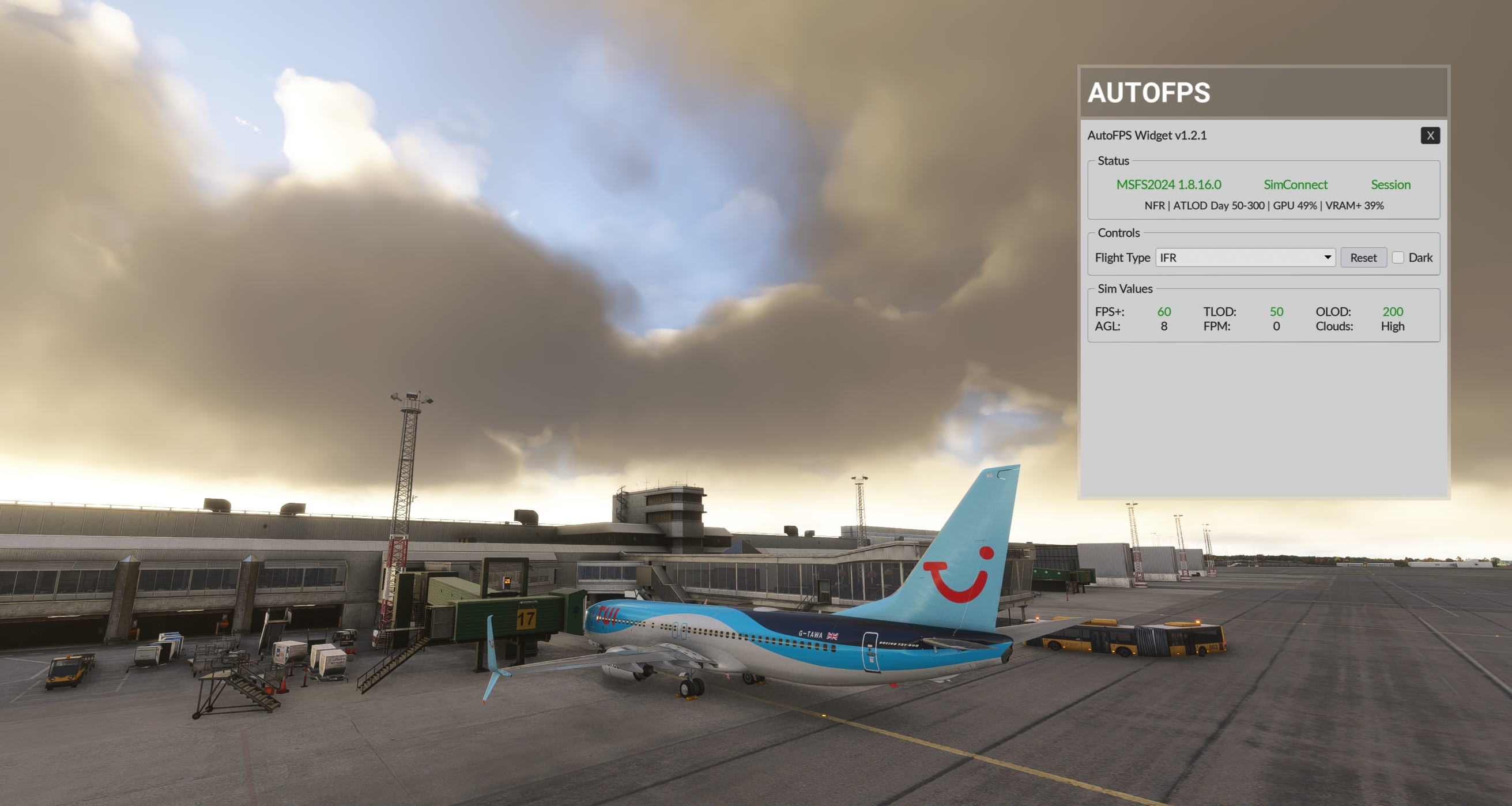
Success 👍 This is what I see now when first opening the widget right after loading a flight and without having first restored the AutoFPS window minimized to the System Tray. Great work and have an even greater weekend! |
|
Excellent! I'm glad it was such an easy fix. |
|
Also works for me. Here is a long flight followed by a runway test like the above. Indeed have a good weekend. |

|
Thanks @WebMaximus and @jerryyyyy for the confirmation that 0.5.4.2-RC1 is working as it should with the sys tray minimised on startup. I have gone ahead and released it as the same RC version number on github, meaning you two don't have to update to it, for others to access if desired. FYI, I am considering some minor enhancements to the widget, such as symbols currently excluded from the TLOD/OLOD data (eg up/down, locked, upper/lower limit) which I had to exclude from initial release because the available widget fonts could not draw those symbols. Also, MAYBE a hotkey toggle of the window too if I can work out how to do it and it can be disabled by default so as not to potentially conflict with other MSFS hotkeys. If I do this, the test version will roll from 0.5.4.2-RC to 0.5.5.0-test ie. 0.5.4.2 will skip the formal release process because, as mentioned before, I do not want to have another app update so soon for the many who are not impacted by the sys tray issue anyway. The auto-updater can handle such an unusual version jump, so you will not be left stranded. |
|
Sounds like a good plan and no pressure, only if/when you can. Just having the widget is already awesome! |
|
@WebMaximus , as requested. Please give it a go and let me know how you go in that new discussion thread for the new test version. |
That's awesome, will give it a try later today! |
|
Just tried it out and works like a charm :-) Thanks so much for adding this, makes quickly checking AutoFPS when in VR so easy. Brilliant!! |
|
I am glad you like it and that it works to your liking. Enjoy! |
|
Hi, |
|
The log will say why. In any case, with Windows being Windows, sometimes data is just not available until the next boot. |
|
Well rebooted and same thing. I see nothing obvious in the log. W11 has gone to a new version maybe? 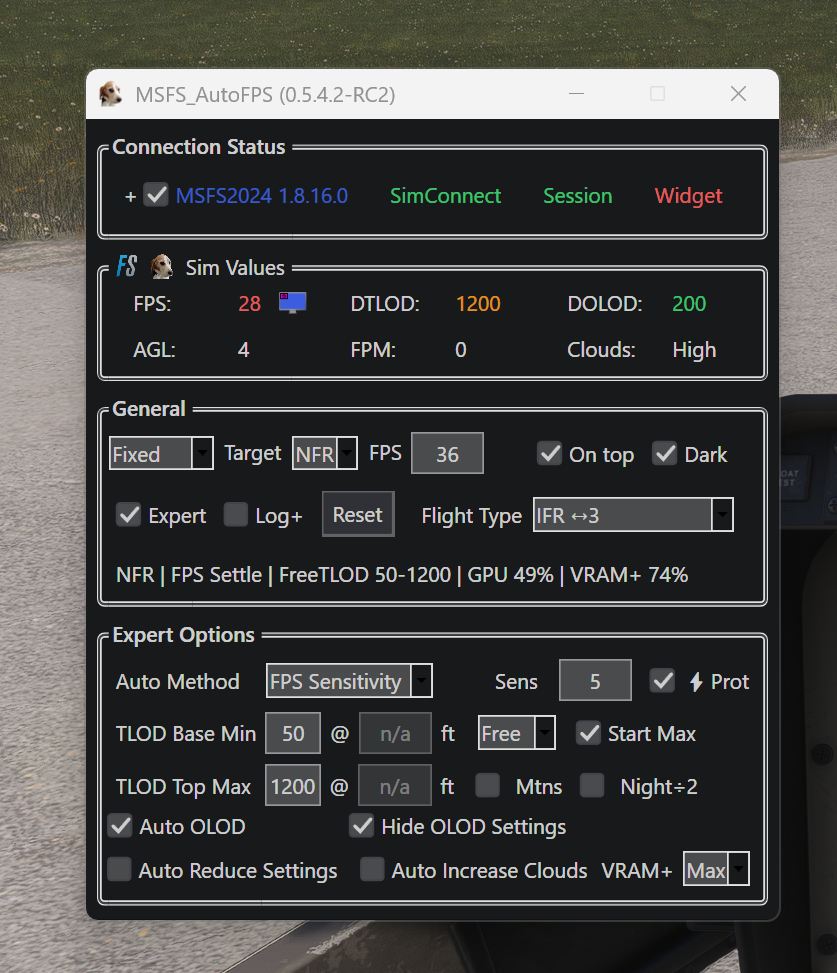
|
|
It's because Log+is unchecked. Recheck it and your CPU data will be back. |
|
Thanks, Duhhhh. I think when we were working the CPU concept we decided it was really that Top2 Cores that were taking the bulk of the CPU load, I recall. I still eyeball these things and the VR at the high settings does use up both CPU and GPU. It does vary enormously with the content visualzed. |


Uh oh!
There was an error while loading. Please reload this page.
Uh oh!
There was an error while loading. Please reload this page.
MSFS Compatibility: 1.39.12.0, 1.8.16.0, 1.9.12.0.
MSFS Widget Version: 1.2.1
Release notes for 0.5.4.1
This major release introduces the new MSFS In-Game Toolbar Widget and local webserver, adds a native Dark Mode theme with title bar and window-handling enhancements, delivers a comprehensive UI layout and text scaling redesign for seamless high-DPI and accessibility scaling, expands RTSS Dynamic Frame Generation support with post-FG targeting, introduces intelligent deferred auto-updating to prevent in-flight update interruptions, adds custom Community folder and Addons Linker management to the installer, and delivers broad stability, SimConnect, and diagnostic improvements.
Please review the updated readme here, which provides a detailed description of the app, installation, features and settings, before asking any questions or raising any issues about the app.
MSFS In-Game Widget & Local Webserver
54321while AutoFPS is active, serving the live telemetry widget to any local web browser or networked device athttp://localhost:54321/.Dark Mode & Window Customisation
[X]button, streamlining intentional exits via the app window context menu, Taskbar "Close window", System Tray, orAlt + F4without prompting.UI Layout & Windows Text Scaling Redesign
RTSS Dynamic Frame Generation & Performance Enhancements
Auto-Update System
Exp+update channel is selected.Installer & Community Folder Management
[Default]/[Custom]tooltip indicators.Install.log) in the app root directory recording all installer actions, detected simulators, selected options, active command-line arguments, and privilege status.General Improvements & Fixes
This discussion was created from the release v0.5.4.0 MSFS Widget and UI Improvements.
All reactions